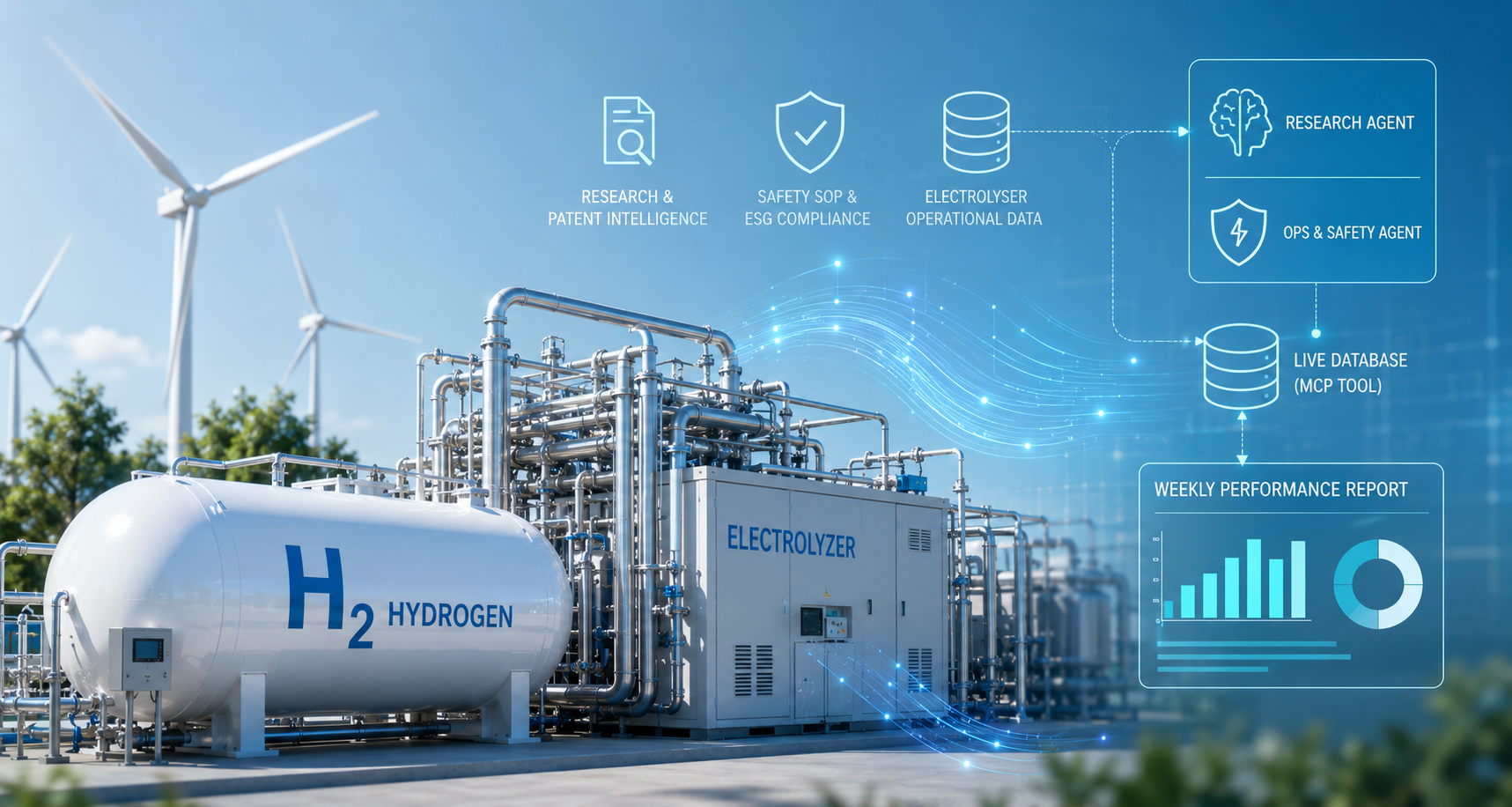
How HRIO prepares electrolyser performance reviews on ThinkStack


An operations engineer reviewing electrolyser performance needs readings, downtime records, and evidence behind each flagged event. HRIO (Hydrogen Research & Intelligence Operations) demonstrates how ThinkStack can assemble that material into a report draft and support follow-up questions with research and procedure references. The example uses mock sensor data in Supabase, two specialist agents, and a scheduled pipeline. Engineers validate the calculations, investigate causes, and approve maintenance or safety actions. The demonstration shows a preparation workflow, not a deployed monitoring or emergency-response system.
What belongs in an electrolyser performance review?
The review starts with a reporting period and the equipment records for that period. Engineers compare efficiency, hydrogen output, energy use, and downtime, then examine flagged events and operator notes. Research papers may help explain a degradation mechanism; approved procedures define the checks and responsibilities at the site. Gathering these sources and reconciling their dates takes work before an engineer can judge the event.
Compare findings across research papers, patent abstracts, and technical reports, with references a researcher can check.
Gather readings, calculate unit-level performance, and prepare a report for the operations review.
Retrieve the relevant procedure and its assigned roles so a qualified reviewer can check its applicability.
Researchers, operations engineers, and safety managers need access to the evidence relevant to their work.
The useful output is a report with per-unit calculations, flagged records, source references, and unresolved questions. A report that omits missing data or presents a recorded fault as a confirmed diagnosis creates more work for the reviewer.
Connect the records needed for the review
The HRIO build record shows two configured agents, three knowledge bases, a custom database tool, and a shared guardrail policy. The reporting pipeline retrieves readings, calculates statistics, and writes a report. The Ops & Safety Intelligence Agent supports follow-up questions across those sources; the Research Intelligence Agent handles technical document comparisons.
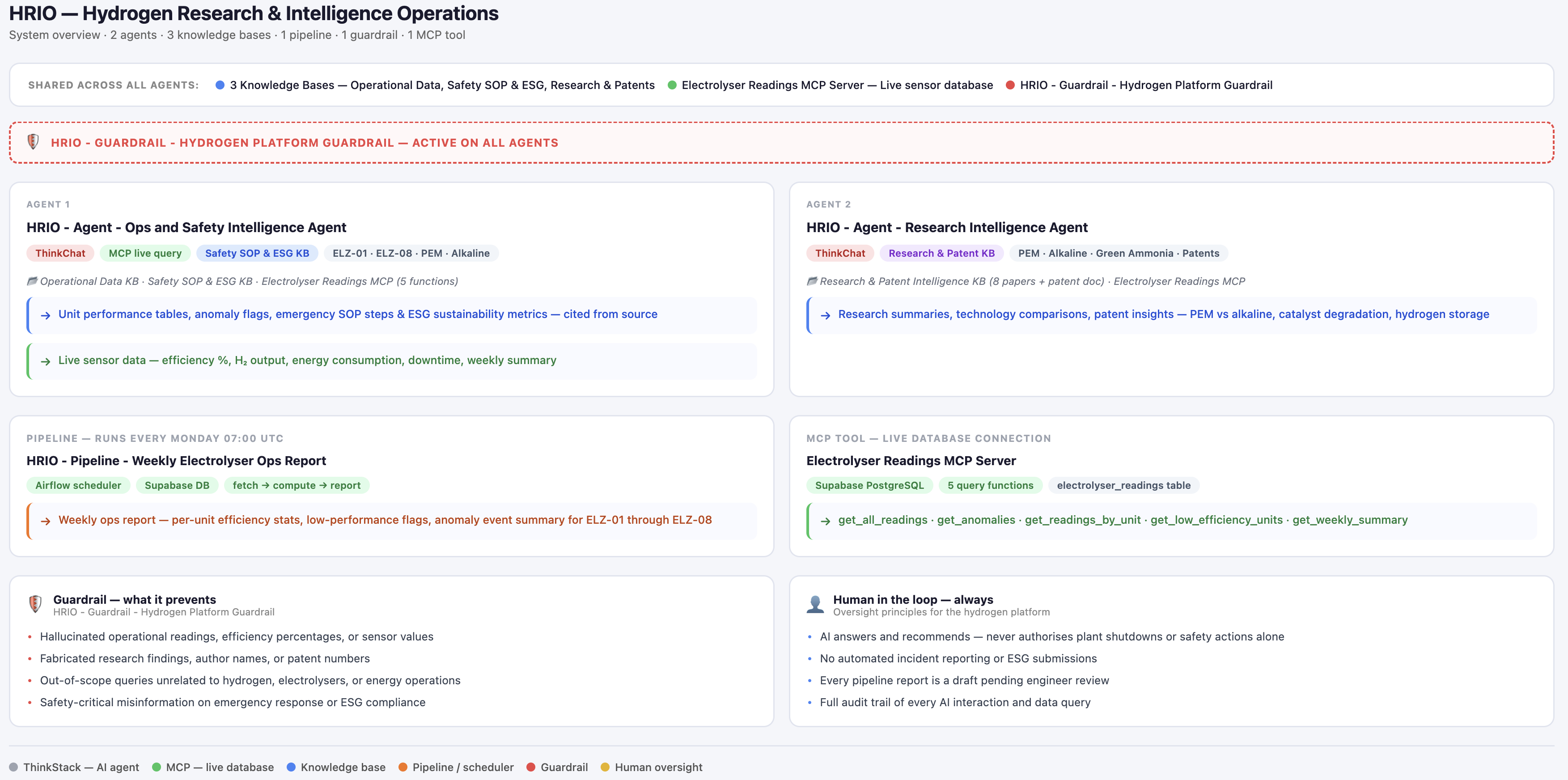
The HRIO agents in ThinkStack’s agent list and chat selector.
Keep research, procedures, and historical readings distinct
Each knowledge base has a defined scope. Agent attachments determine which sources are available for a question.
The Research & Patent Intelligence library contains PEM (proton exchange membrane) and alkaline electrolyser papers, patent abstracts, and material on cost, efficiency, degradation, and green ammonia production. A comparison needs the cited paper’s date, assumptions, and operating conditions.
The Safety SOP & ESG Compliance library contains a ten-step hydrogen leak standard operating procedure (SOP) with assigned roles, plus a sustainability report. These are demonstration references. Their inclusion does not establish a site’s compliance or environmental performance.
The Electrolyser Operational Data library contains 48 historical records across six days for eight units, ELZ-01 through ELZ-08, with nine flagged anomaly events. Fields include efficiency, hydrogen output, energy consumption, downtime, and operator notes.
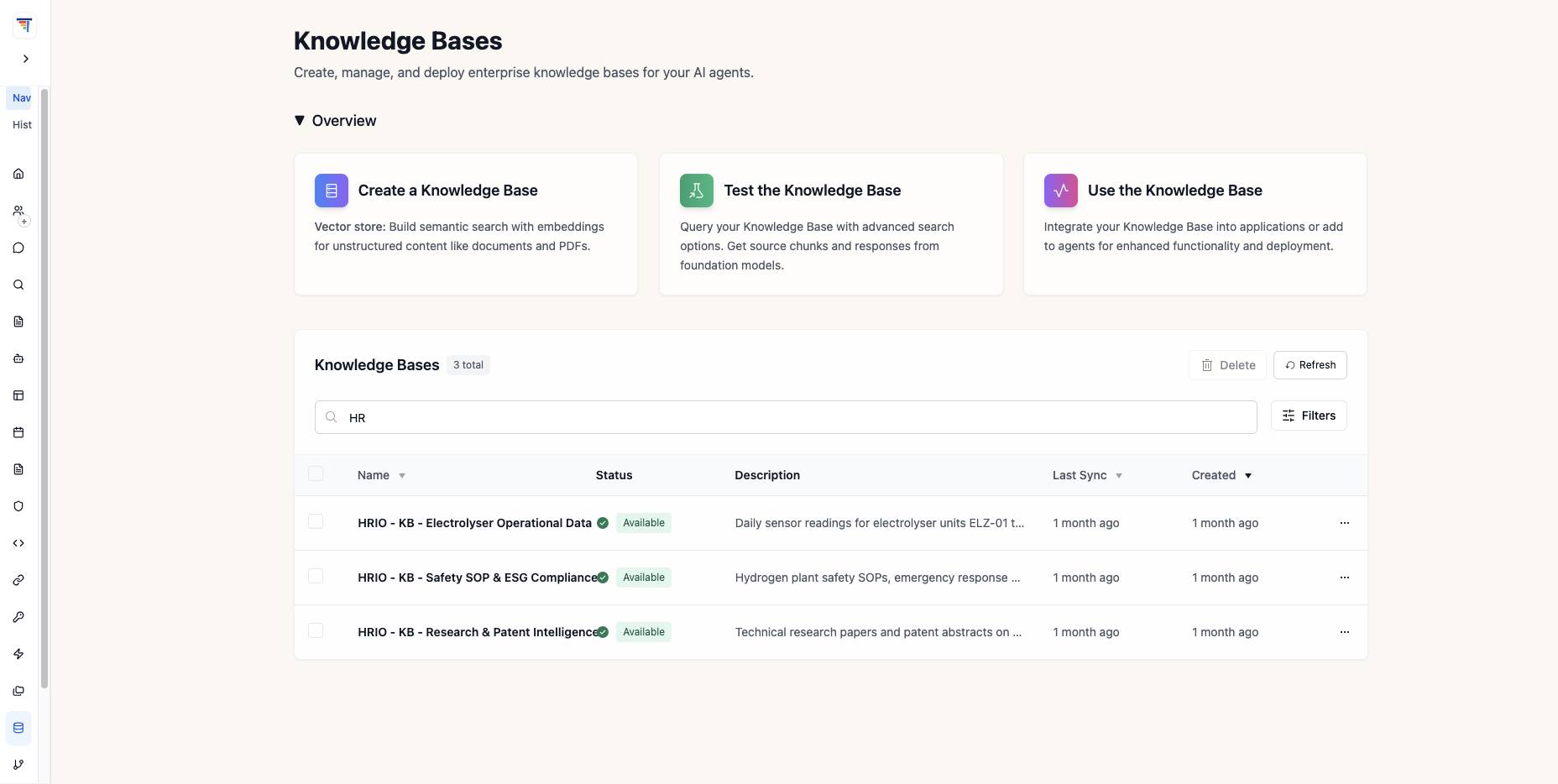
The three HRIO knowledge bases and their document counts.
Use a database query for the equipment records
The Ops & Safety Intelligence Agent queries the mock records in Supabase through a custom Model Context Protocol (MCP) tool. The connection is to a running database, not a verified continuous equipment feed. Five functions define the available queries:
A question about flagged units can call get_anomalies. For site use, the query must enforce the requested date range and expose missing records. A six-day dataset needs that limitation shown in any report labeled “weekly.”
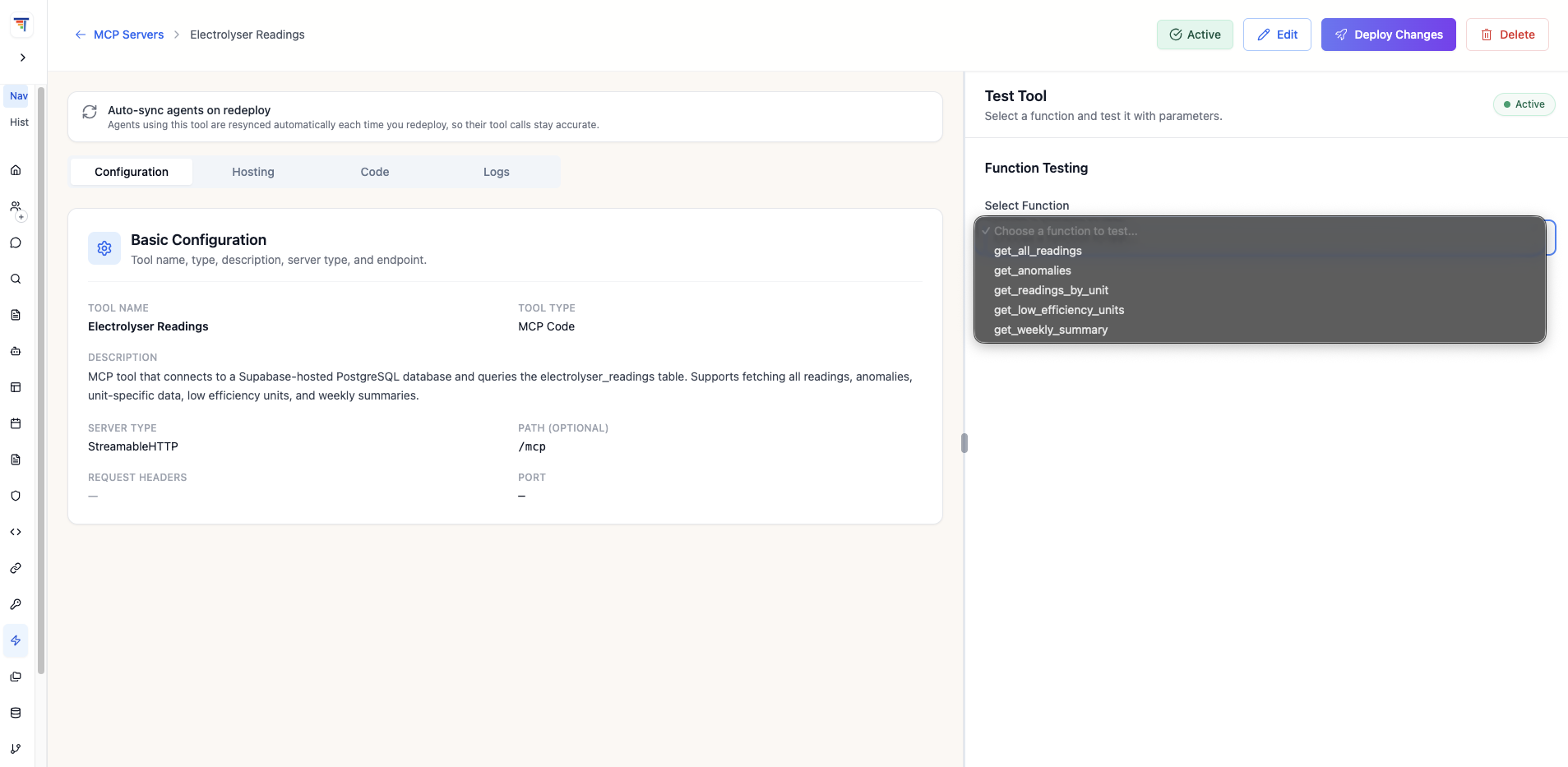
The HRIO Electrolyser Readings MCP tool and its query functions.
Configure response checks and inspect their decisions
Both agents have the shared HRIO Hydrogen Platform Guardrail attached. Its configuration includes:
- Contextual grounding: a configured threshold of 0.7 for checking responses against retrieved context. This is a policy setting, not a measured accuracy rate.
- Topic filters: restrictions on investment advice, medical topics, and questions outside hydrogen research and operations.
- Prompt attack protection: checks intended to detect attempts to override the agent’s instructions.
These checks do not establish correctness. Policy & Guardrails records configured policy decisions, while Observability & Tracing supports inspection of retrievals and tool calls. Engineers still check whether a cited passage is current and applicable.
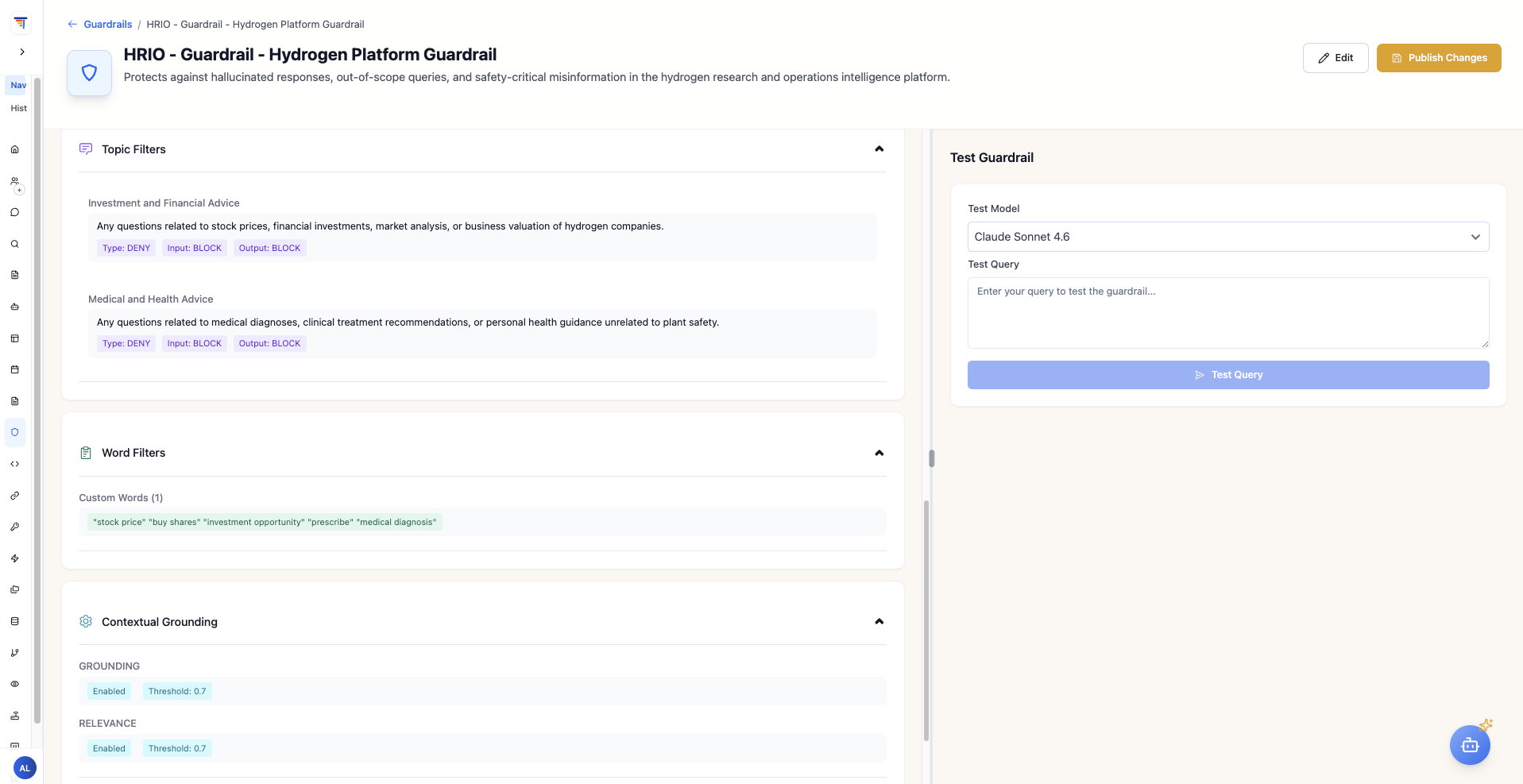
The shared HRIO policy’s grounding, topic-filter, and prompt-protection settings.
Separate research questions from operations questions
Research Intelligence Agent
The Research Intelligence Agent uses the research library to summarise papers, find patent material, and compare technology claims. Its response gives the engineer references to inspect. A figure from one study should retain the conditions under which it was measured.
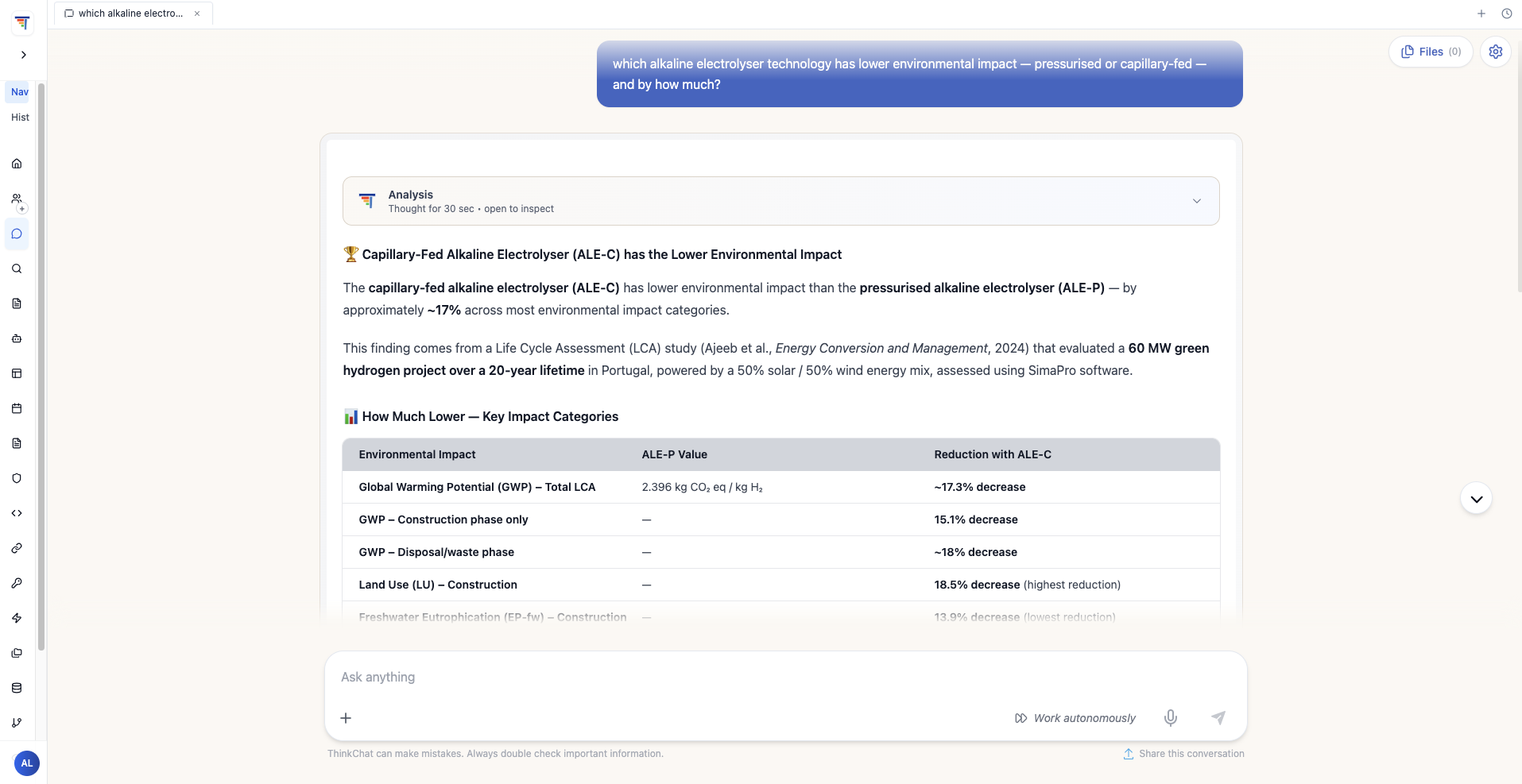
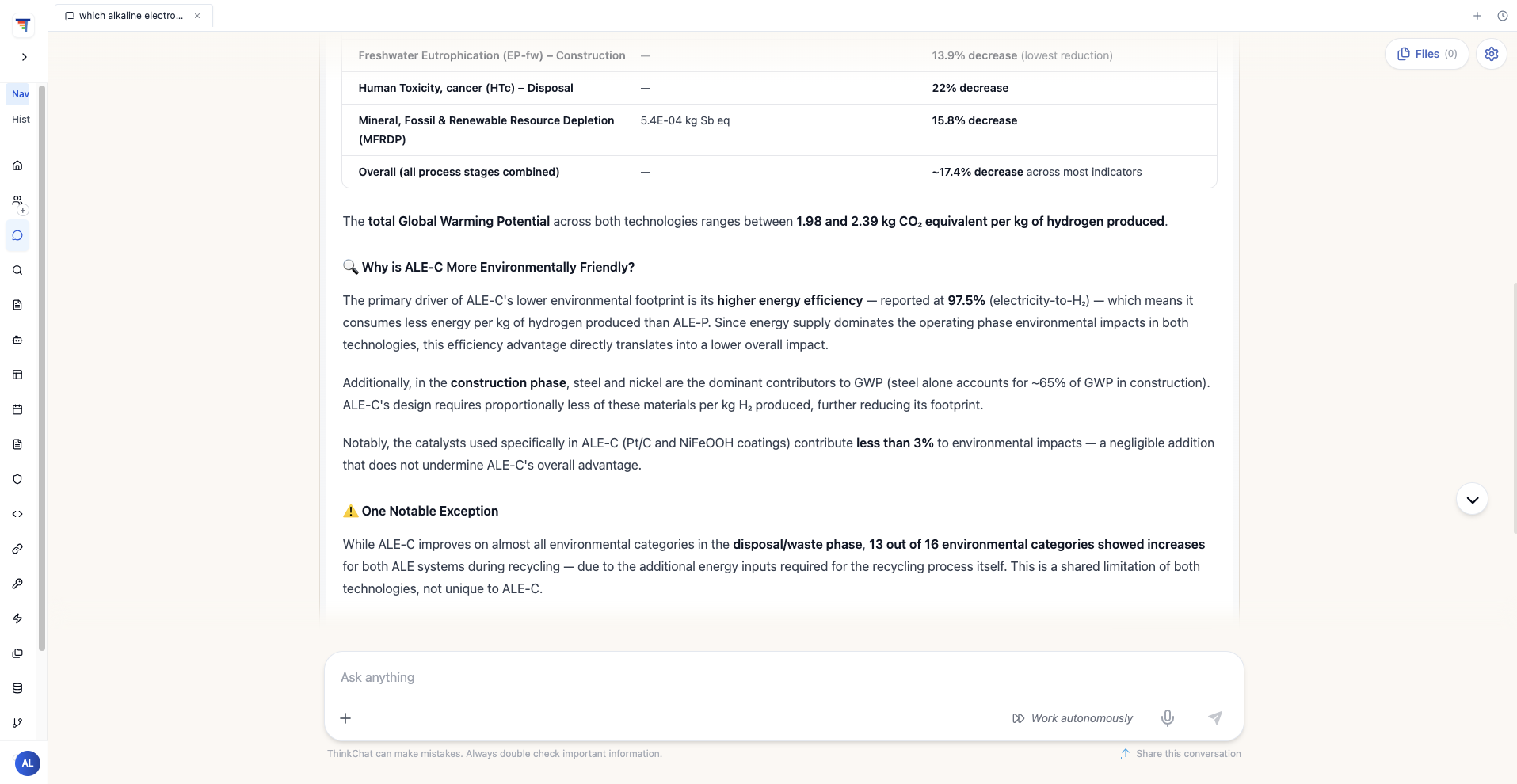
Example research response with figures and document references. Check the cited passages and comparison assumptions.
Ops & Safety Intelligence Agent
The Ops & Safety Intelligence Agent can retrieve records, related research, and procedure passages in one response. A flagged anomaly does not establish a leak, and a retrieved emergency procedure is not an approved instruction to act. The site’s established incident process governs an emergency.
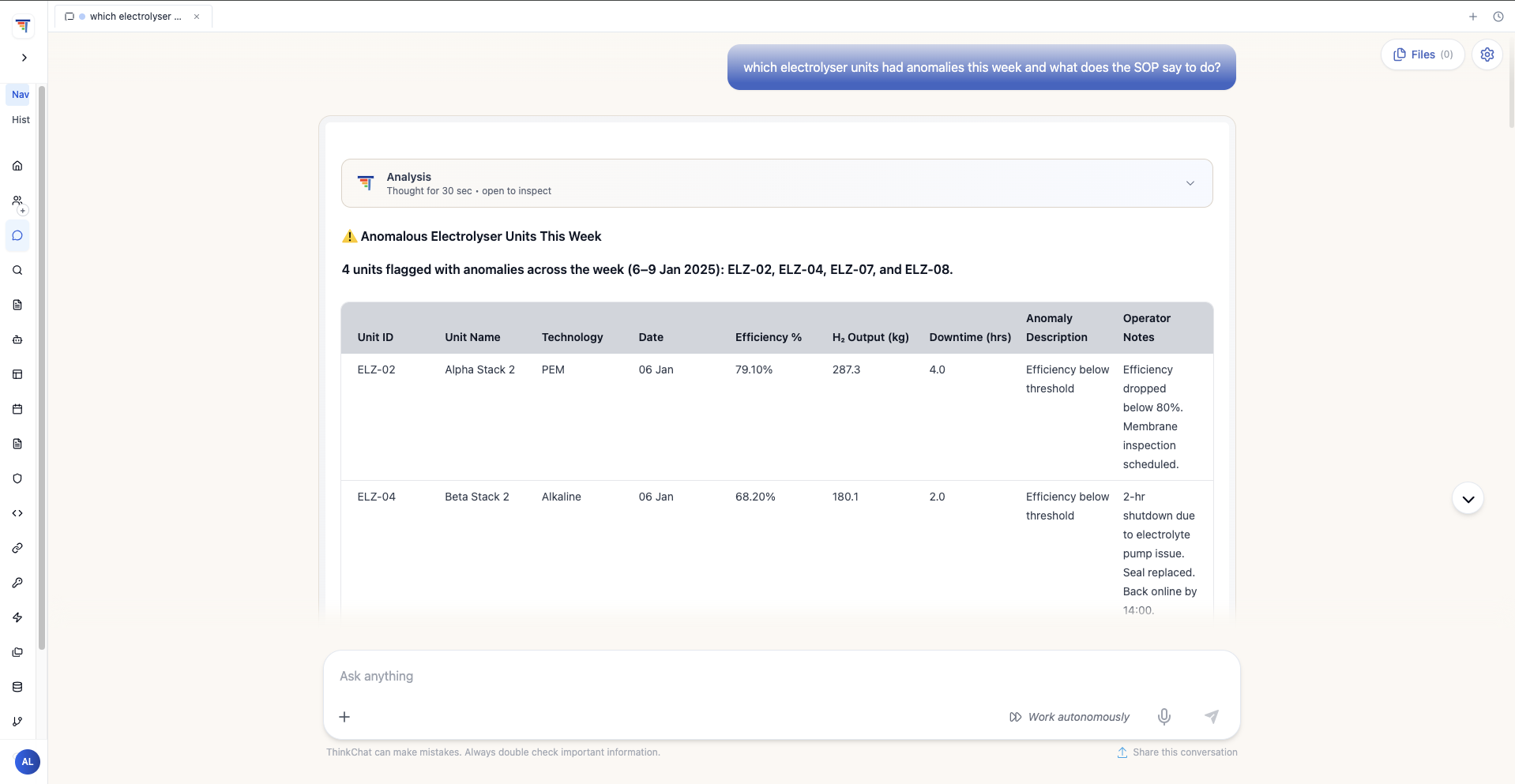
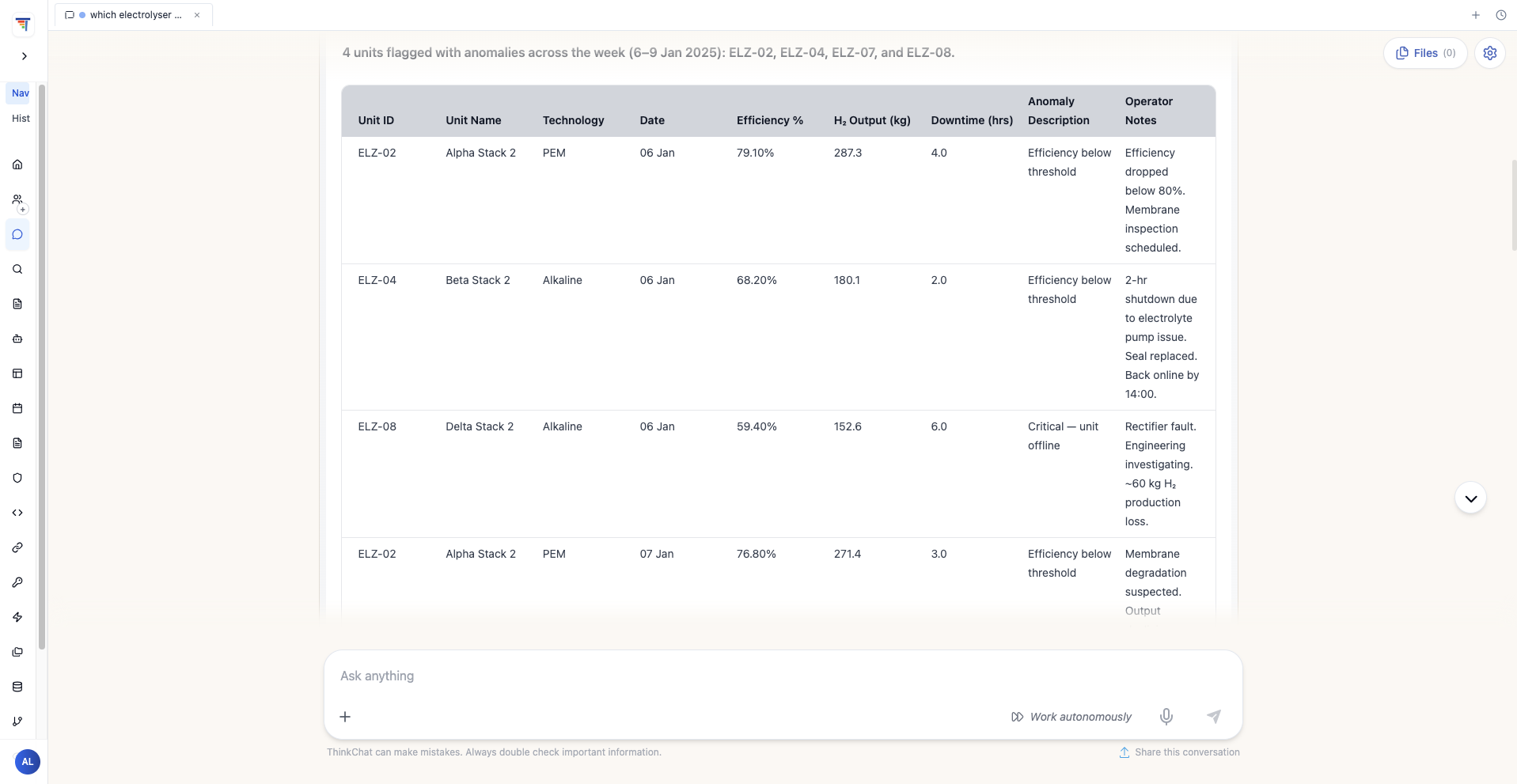
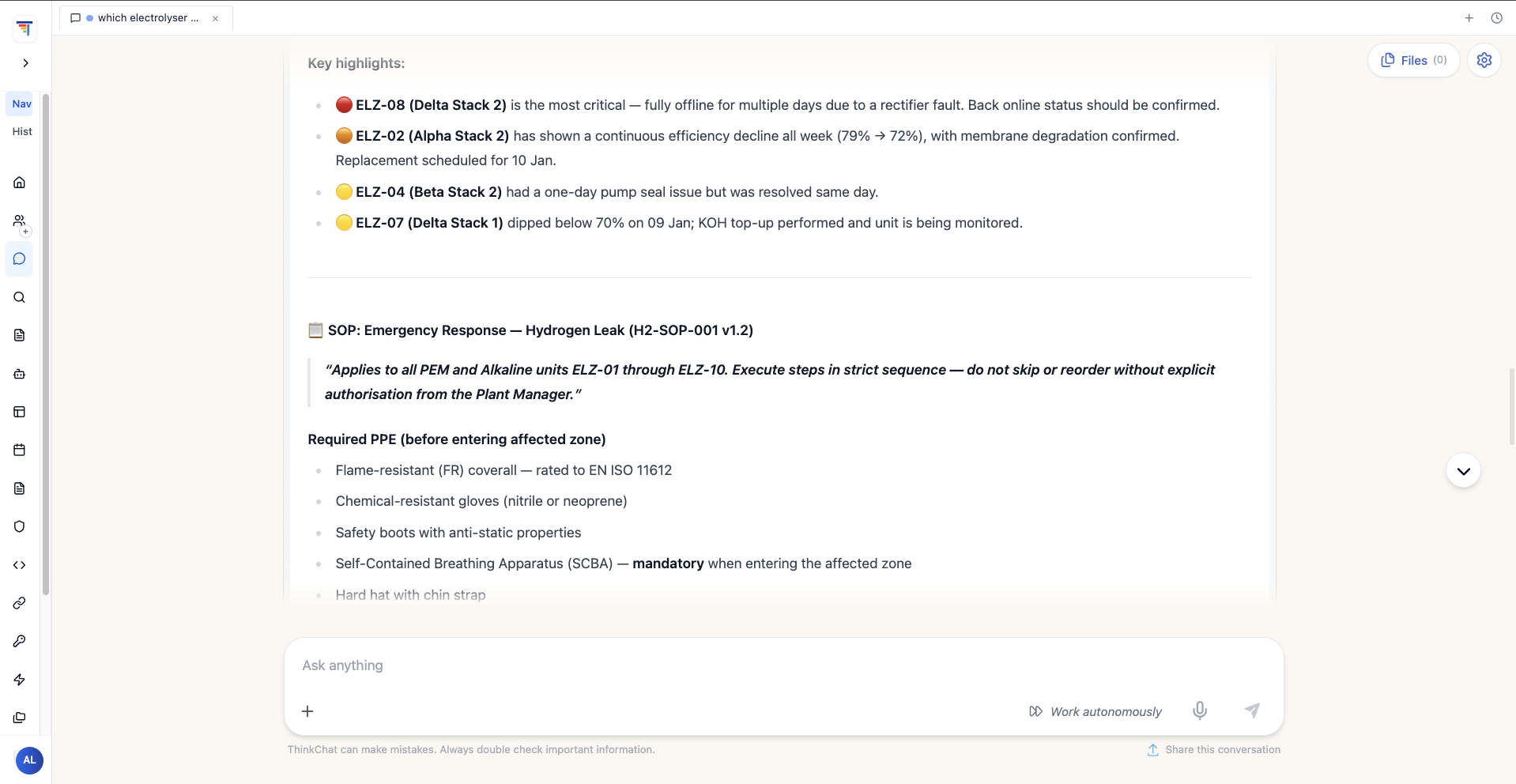
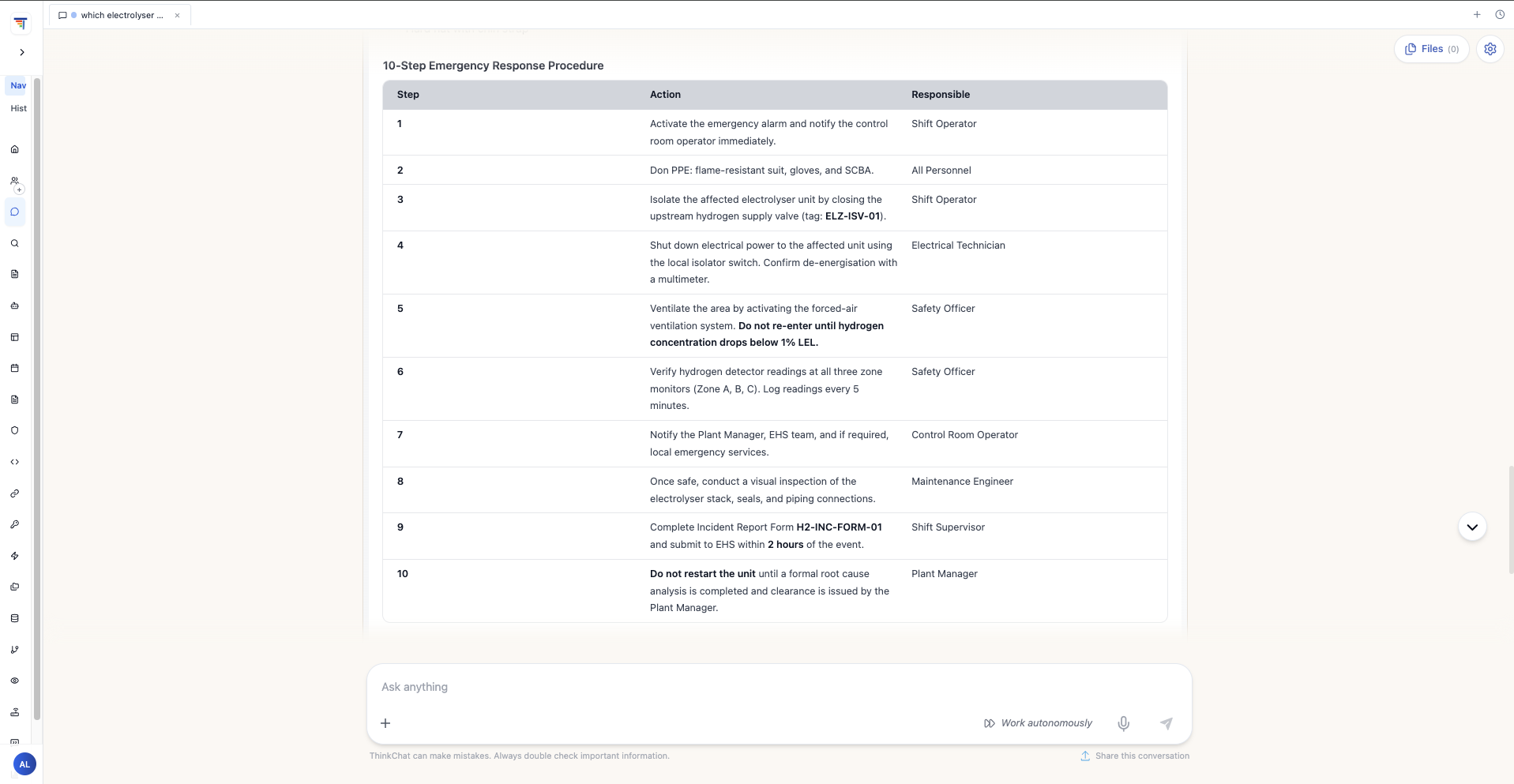
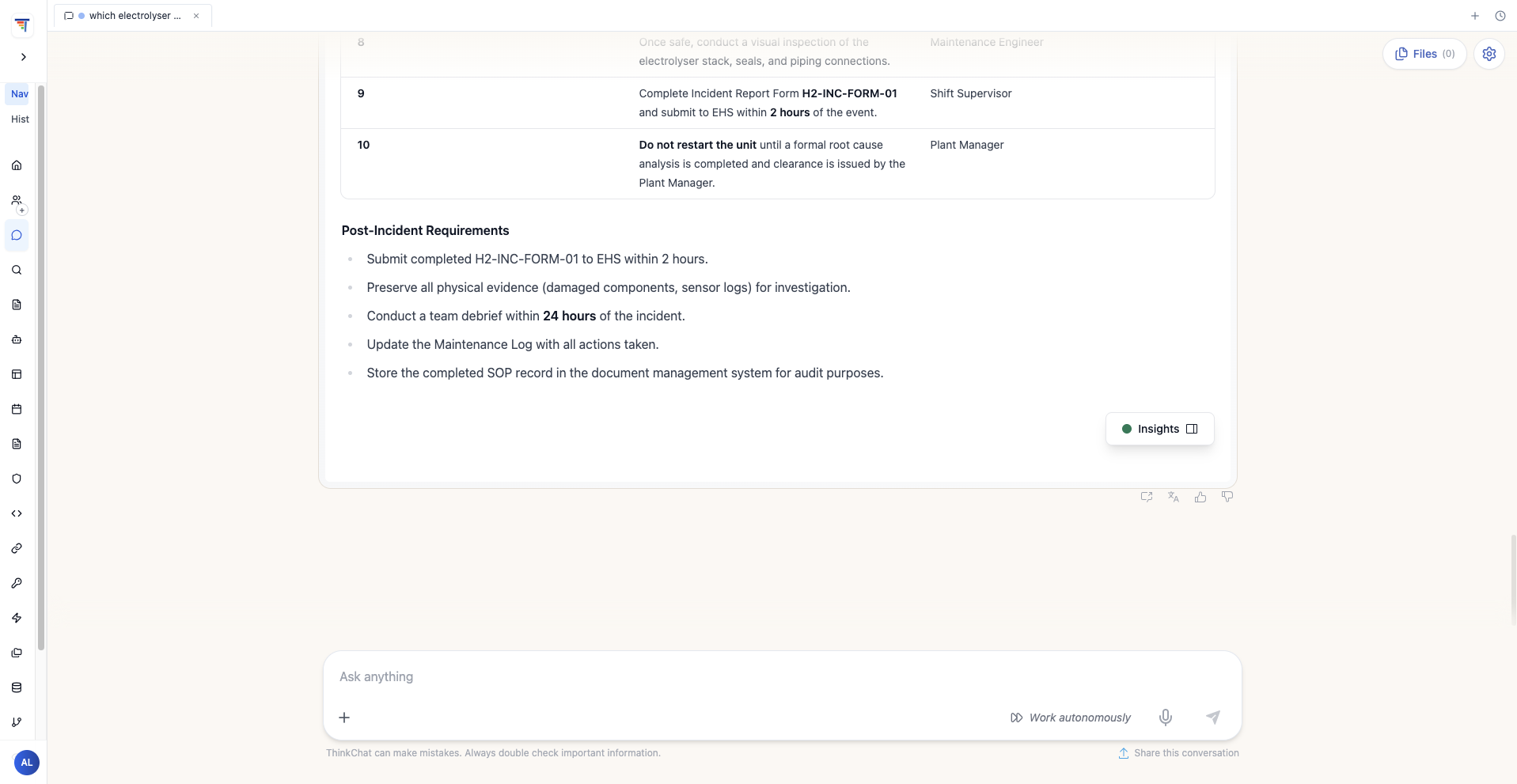
Demonstration response combining mock ELZ-02 and ELZ-08 records with procedure passages for engineering review.
Prepare the report, then hand it to an engineer
The example pipeline is configured for Mondays at 07:00 UTC. Its three stages fetch database records, calculate unit-level statistics, and write a report to the pipeline output. The build record does not establish unattended delivery to an operating team.
Queries the Supabase demonstration database for sensor records.
Calculates average efficiency, hydrogen output, downtime, and anomaly counts by unit; flags efficiency below the configured 70% threshold.
Formats the statistics as a weekly operations report and writes it to the pipeline output.
| Step | Agent action | Human responsibility | Output or control |
|---|---|---|---|
| Retrieve | Query mock records through the configured tool | For a site pilot, confirm period, units, access, and coverage | Site requirement: dated records and explicit gaps |
| Calculate | Compute configured unit statistics | Validate definitions and reconcile totals | Per-unit table and flagged records |
| Investigate | Retrieve research and procedure passages | Assess applicability and establish cause | Source passages; reviewer records unresolved questions |
| Review | Write the report to pipeline output | Approve actions; proposed site owner handles failed or incomplete runs | Proposed reviewed handoff; delivery still needs testing |
The example report lists ELZ-05 at 85.5% average efficiency and zero downtime, four anomalies for ELZ-02, and 62 hours of downtime for ELZ-08. It totals 11,688 kg of hydrogen output across eight units. Membrane degradation and a rectifier fault are recorded in the mock example; engineers would need evidence to confirm those diagnoses at a site. These figures demonstrate the output format, not customer results.
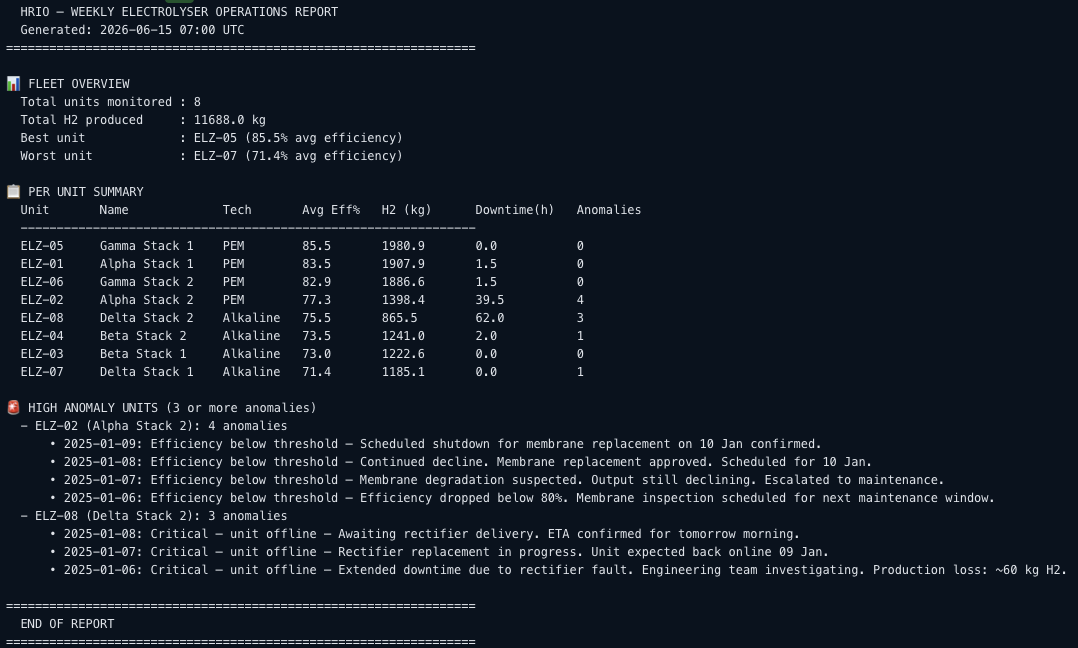
Example pipeline output showing the fleet overview, per-unit table, and flagged records for ELZ-02 and ELZ-08.
How should a site evaluate the workflow?
The build’s HRIO Research Agent Quality template scores document-grounded answers from 0 to 1. Its five questions cover cost projections, environmental comparisons, green ammonia efficiency, and patent analysis. That small research test does not validate the operations report or safety-related responses.
A site evaluation should compare the existing reporting process with HRIO using the same records. Measure preparation time, engineering review time, calculation and citation errors, missing-data detection, rework, and run cost. Include unavailable tools, conflicting records, and outdated procedures. Evaluation Harness supports custom rubrics, repeat runs, and expert calibration; engineers must also reconcile reported totals with source data.
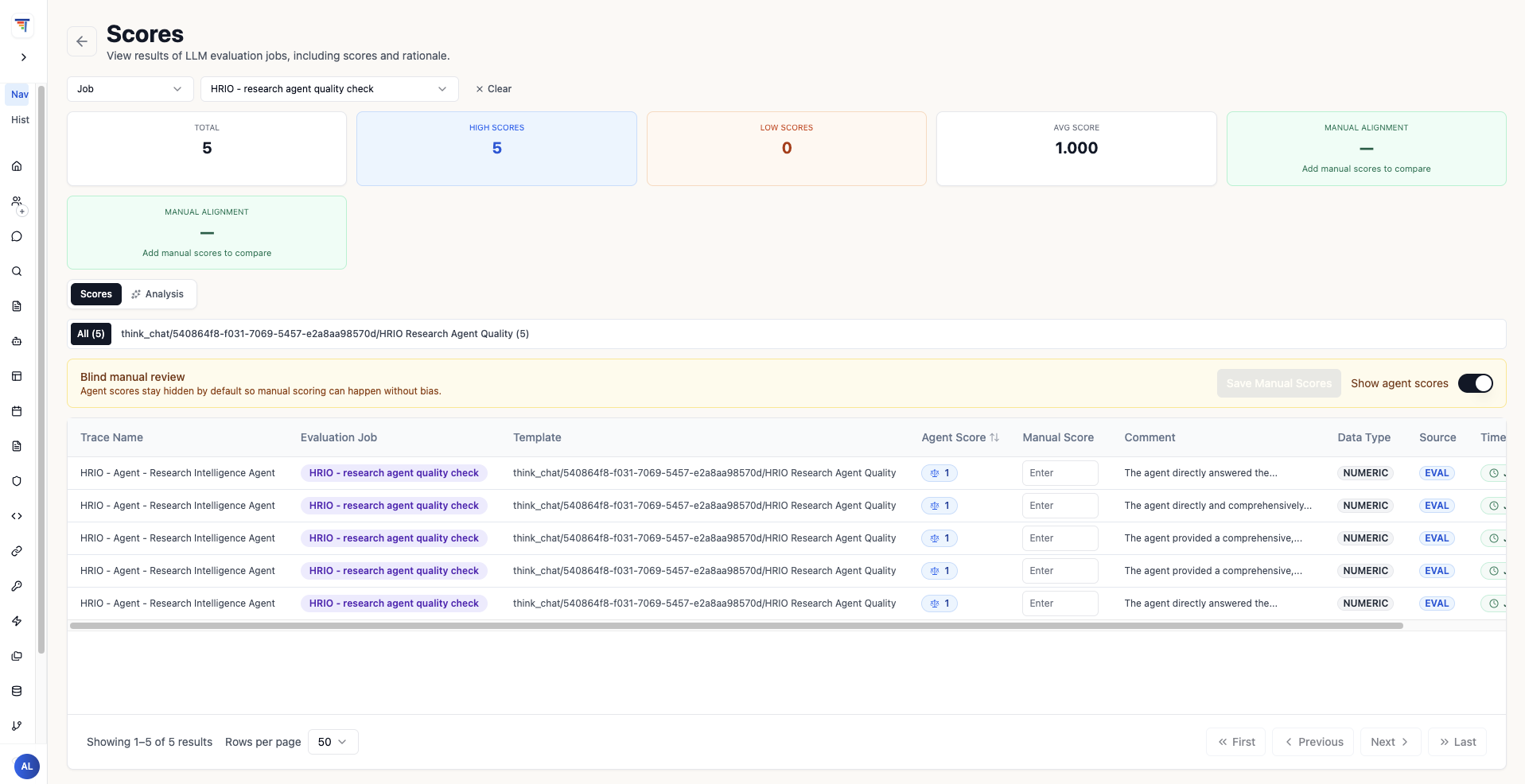
The HRIO research evaluation’s five traces, with scores and reasoning available for review.
Follow a flagged record into an investigation
After reviewing the report, an engineer might ask:
The agent can prepare the supporting material in three steps:
- Query the equipment records
Retrieve ELZ-02’s flagged records from Supabase through the MCP tool, retaining the unit ID and reporting period.
- Retrieve relevant research
Retrieve membrane degradation passages from the research knowledge base and include references for the engineer to inspect.
- Check procedure applicability
Retrieve procedure passages for a reviewer to assess. A flagged equipment anomaly alone does not establish a hydrogen leak or make a leak emergency procedure applicable.
This matches the maintenance investigation and production performance workflows in ThinkStack’s manufacturing solution materials. The agent prepares evidence and calculations; reliability engineers diagnose faults and approve work. Conventional database reporting may be sufficient for a stable summary. HRIO adds document retrieval when the review requires research or procedure context.
What must be resolved before connecting site data?
Start with approved sources and a defined review owner. Knowledge Base Management describes source attribution and document lifecycle controls. MCP Server Management provides routes for custom tools and compatible existing endpoints. The Supabase demonstration does not prove a ready-made connector for a site’s historian or supervisory control and data acquisition (SCADA) system.
- Select the research library
Record versions and review dates for research and procedures. Restrict retrieval to the material the intended users are permitted to access.
- Connect the operating data
Define permitted queries, unit identifiers, date ranges, and expected results for the actual database or historian. Test the connection and reconcile returned values before using them in a report.
- Choose a review workflow
Agree on efficiency definitions, downtime aggregation, anomaly flags, and acceptance criteria with the engineering reviewer.
- Set up the report handoff
For a proposed site workflow, route an incomplete query or failed run to a named operations owner. Show the missing evidence and withhold operational recommendations until the reviewer resolves it. Test report delivery separately from generation.
Use the manufacturing workflow descriptions to scope a first review with a reporting period, representative records, approved procedures, and a named engineer. Compare the reviewed output with the existing process before expanding the pilot.