Building PICA:Agentic AI for Pharma Compliance & Drug Safety


Pharma compliance is unforgiving. Miss a reporting deadline, overlook an open quality issue, or file an incorrect regulatory response — and the consequences range from costly audit findings to product recalls. Most compliance teams are still managing this manually: digging through dense regulation documents, tracking corrective actions across spreadsheets, and monitoring reporting windows that vary by regulatory body, jurisdiction, and event severity. We built PICA (Pharma Intelligence & Compliance Automation) to change that.
Pharma Compliance Is Complex, High-Stakes, and Manual
A single missed deadline or incorrect answer can trigger an audit, a product recall, or direct regulatory action. The operational burden is not hypothetical — it is daily, compounding, and distributed across teams who are expected to know the rules for every market they operate in.
FDA, EMA, CDSCO — each with their own rules, deadlines, and documentation requirements. Compliance teams must track all of them at once across multiple products and sites.
Serious adverse events must be reported within 15 calendar days of awareness. Fatal or life-threatening reactions within 7 days. Compliance teams manage hundreds of cases simultaneously.
Corrective and Preventive Actions pile up across multiple manufacturing sites. Tracking status, severity, and deadlines manually across spreadsheets is slow and error-prone.
Compliance officers dig through dense regulatory documents to answer questions that should take minutes — time that could be spent on actual compliance decisions.
PICA — Pharma Intelligence & Compliance Automation — replaces this manual overhead with an agentic AI system that knows the regulations, monitors the live CAPA database, and generates compliance documents automatically. So your team focuses on decisions, not research.
One Platform, Three Use Cases
PICA runs on ThinkStack — the infrastructure that coordinates specialist AI agents, enforces guardrails, and gives you full visibility into everything happening under the hood. Three specialist agents share three domain-specific knowledge bases, a live CAPA database connection via MCP, and a single guardrail policy active across all of them simultaneously. Below are the three use cases PICA delivers out of the box.
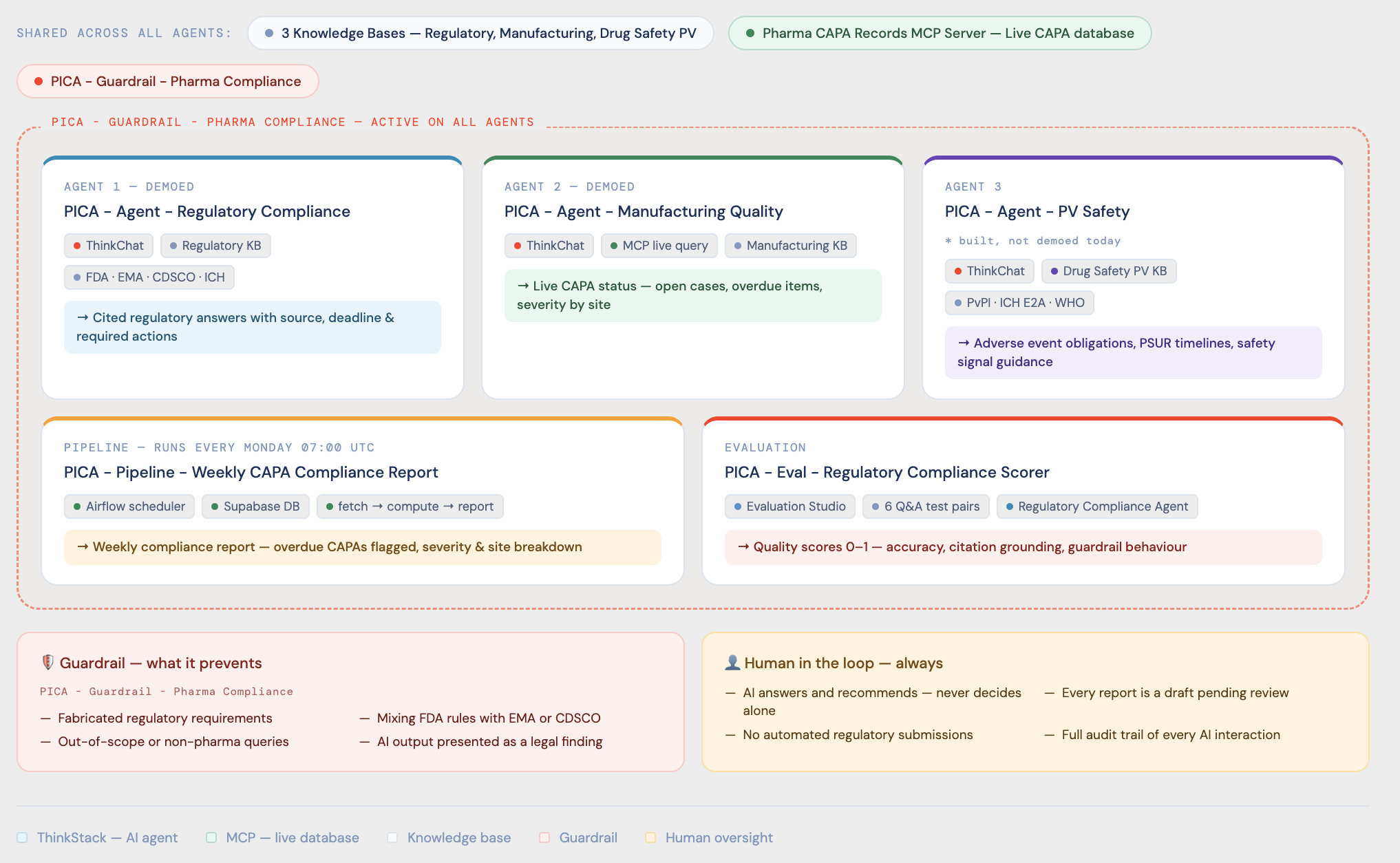
The full PICA system in ThinkStack: three specialist agents sharing three knowledge bases and one live Pharma CAPA Records MCP Server, governed by a single Pharma Compliance guardrail — with a weekly automated pipeline and a live evaluation scorer.
The Pharma CAPA Records MCP Server is a live connection to the Supabase database containing CAPA and deviation records. Any agent with permission can query it in real time — no data export, no sync delay. Below is the Manufacturing Quality Agent doing exactly that: a quality manager asks which CAPAs are open and overdue, and the agent routes to the live database via MCP and returns real-time results in seconds.
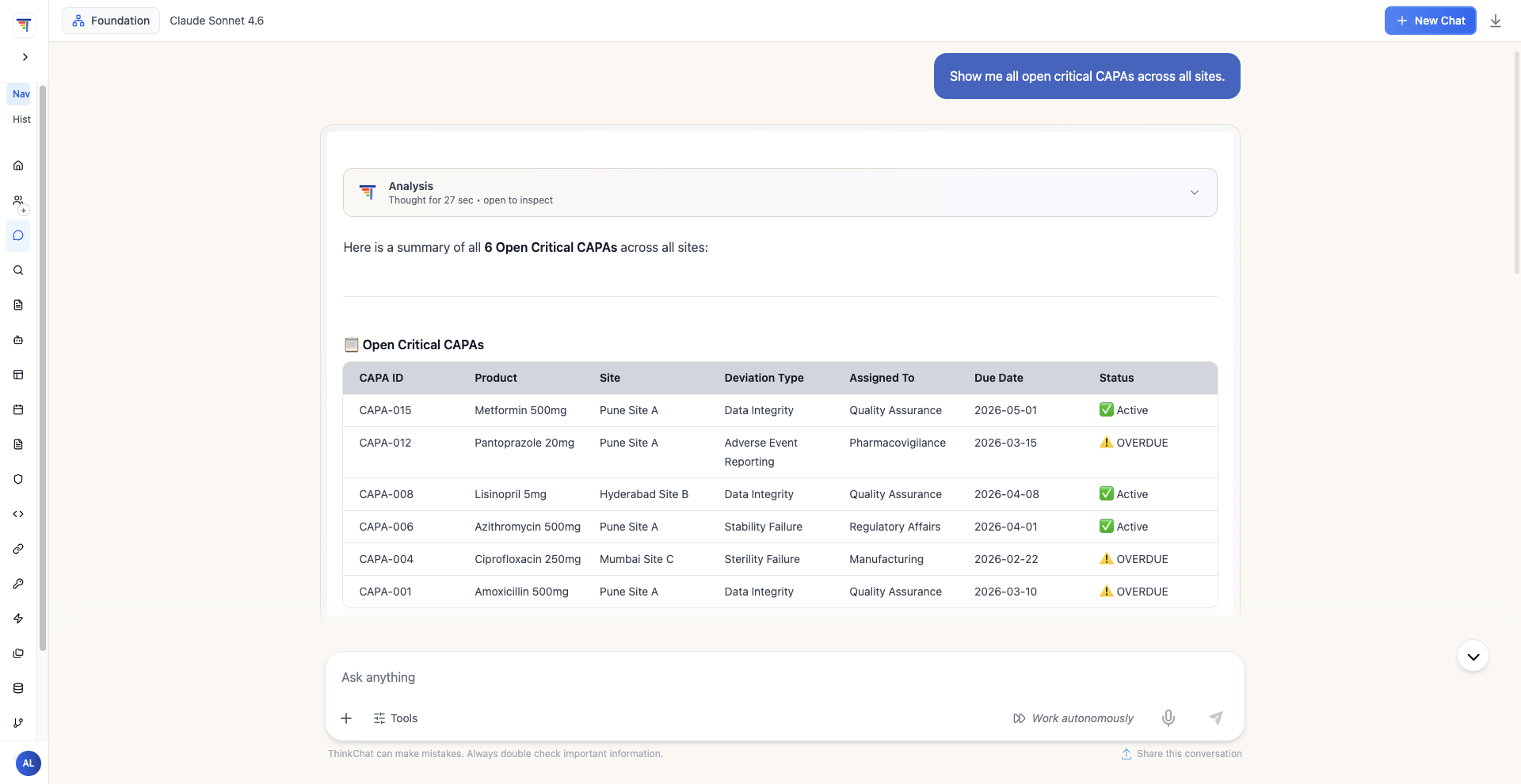
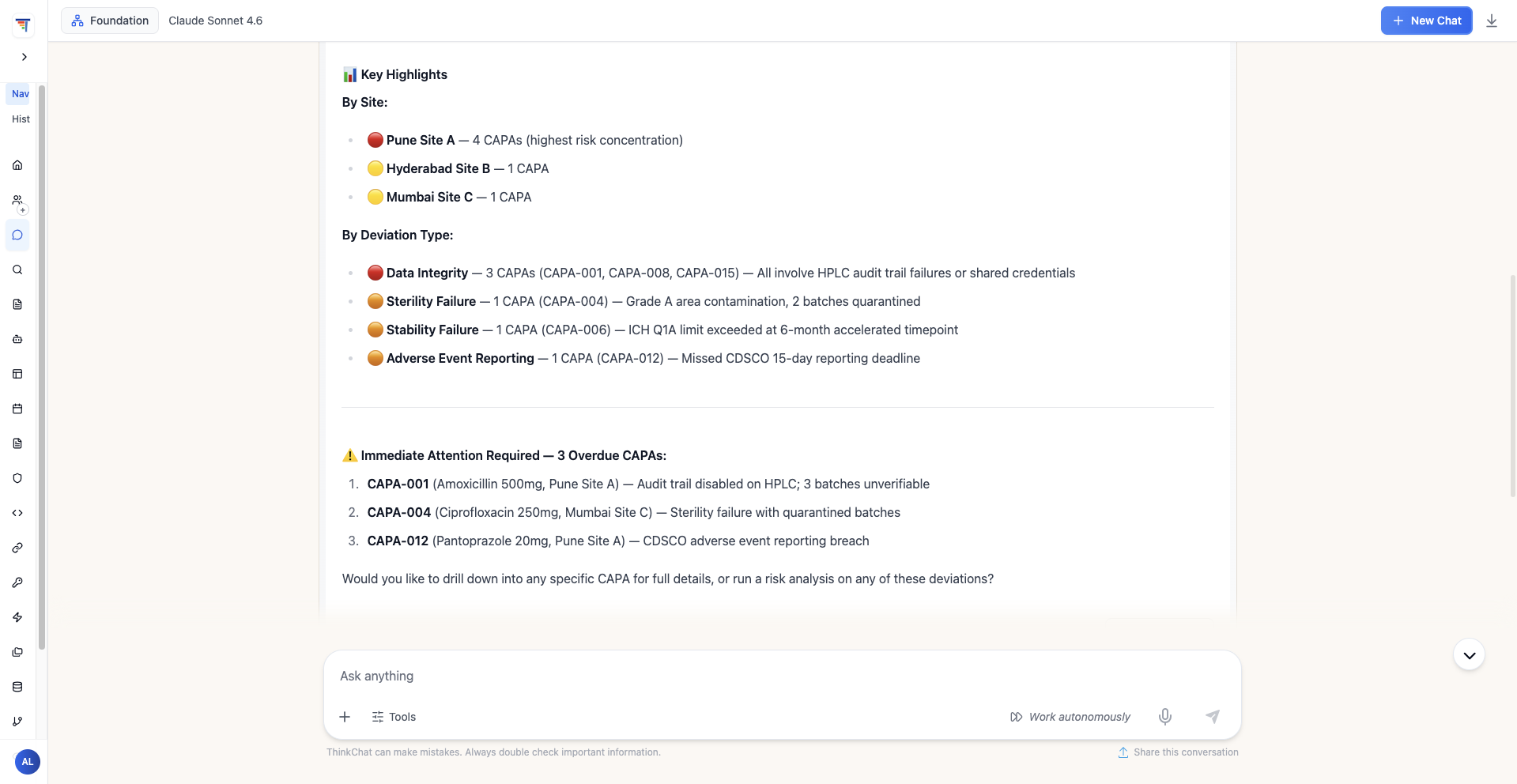
The Manufacturing Quality Agent querying the live Supabase CAPA database via MCP: open critical cases returned as a structured table, followed by site-level breakdown and 3 overdue CAPAs flagged for immediate attention — all in real time, no manual export required.
Three Use Cases, Expanded
Each section below covers one complete use case — what it does, how it works, and what gets produced. Click any card to expand it.
A compliance officer types a question in plain English via ThinkChat — "What are the GMP requirements for investigating a batch failure, and what must be documented?" — and gets back a cited, document-grounded answer in under 30 seconds. No digging through regulation PDFs. No escalating to legal. The agent does the research.
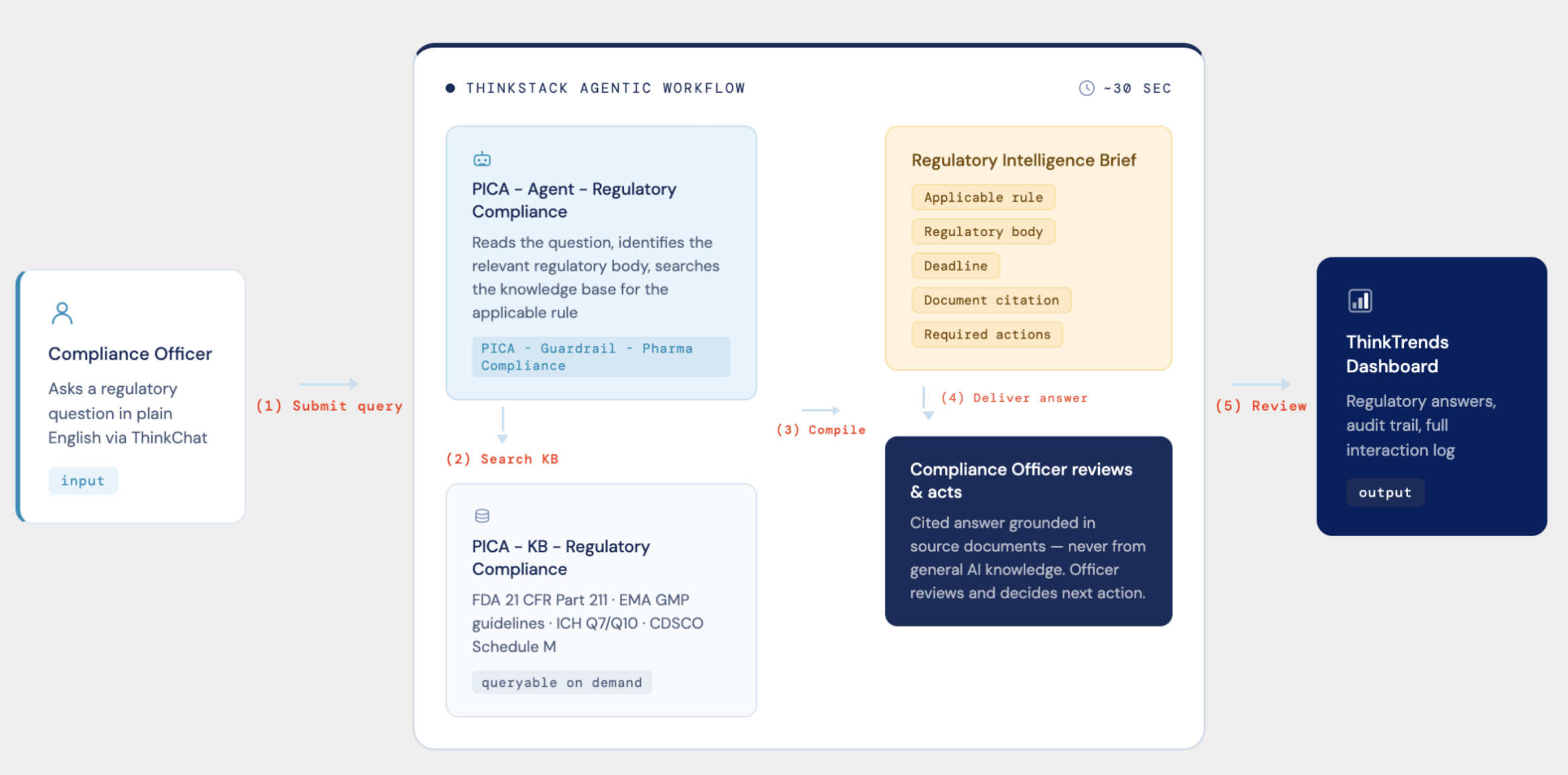
Use Case 1 workflow: the compliance officer submits a query, the agent searches the regulatory knowledge base, compiles a Regulatory Intelligence Brief with applicable rule, deadline, and document citation, then logs the full interaction to the ThinkTrends Dashboard.
How It Works
Compliance officer asks a regulatory question in natural language via ThinkChat. The PICA Guardrail — Pharma Compliance activates immediately.
The agent searches PICA – KB – Regulatory Compliance: FDA 21 CFR Part 211, EMA GMP guidelines, ICH Q7/Q10, and CDSCO Schedule M — all indexed and queryable on demand.
The agent assembles a structured brief: applicable rule, regulatory body, deadline, document citation, and required actions. Every field grounded in the source document.
Answer is delivered to the compliance officer. The full interaction — input, retrieved documents, output, latency, cost — is logged in the ThinkTrends Dashboard for audit.
What Gets Produced
A Regulatory Intelligence Brief containing: the applicable rule and jurisdiction, the specific deadline, the required action, and the source document and section number. Not a general AI answer — a cited, traceable compliance reference the officer can act on and defend to an inspector.
The agent never answers from general AI knowledge. Every response is grounded in the documents in the knowledge base. This is the difference between a compliance tool your team can trust and one they have to double-check every time.
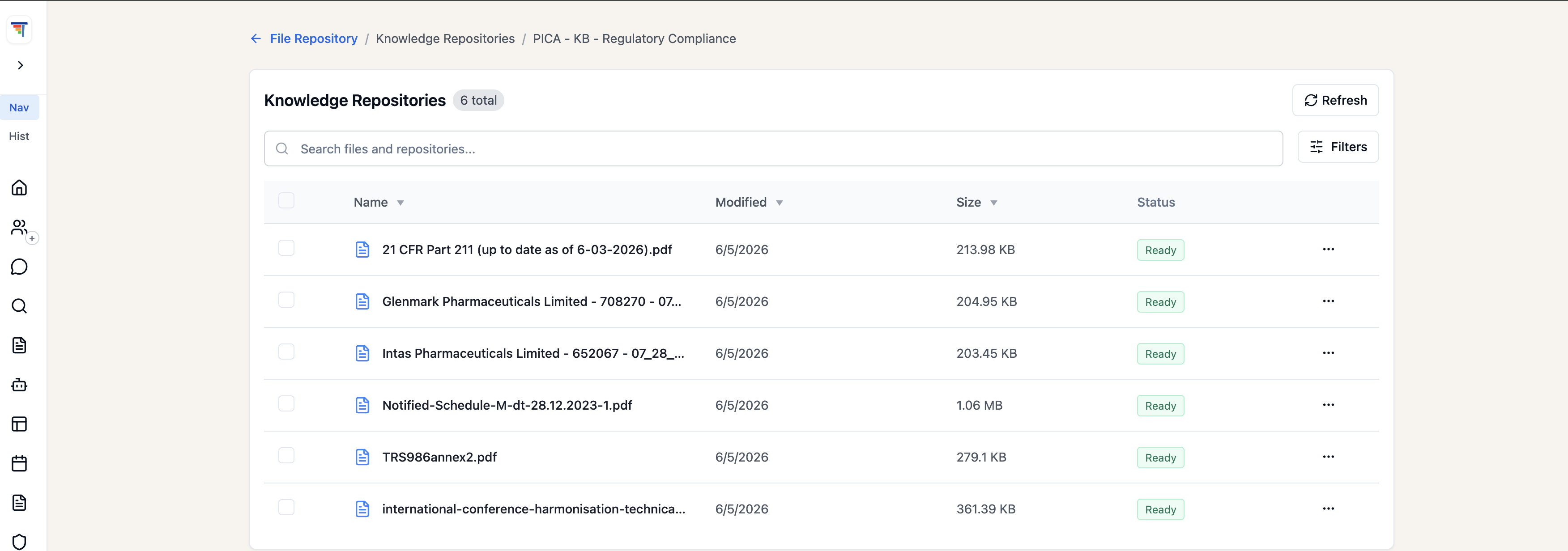
The Regulatory Compliance knowledge base in ThinkStack: six regulatory documents — FDA 21 CFR Part 211, EMA GMP guidelines, ICH frameworks, and CDSCO Schedule M — indexed, versioned, and queryable on demand by any authorized agent.
Agent Output — Full Response
Below is the actual output from the Regulatory Compliance Agent responding to the question "What are the GMP requirements for investigating a batch failure, and what must be documented?" The agent cites FDA 21 CFR § 211.192, WHO GMP Technical Report Series, CDSCO/Indian GMP Schedule M, and OOS investigation requirements — ending with a Quick Reference Summary Table that cross-references all three frameworks side by side. The carousel auto-advances every 4 seconds.
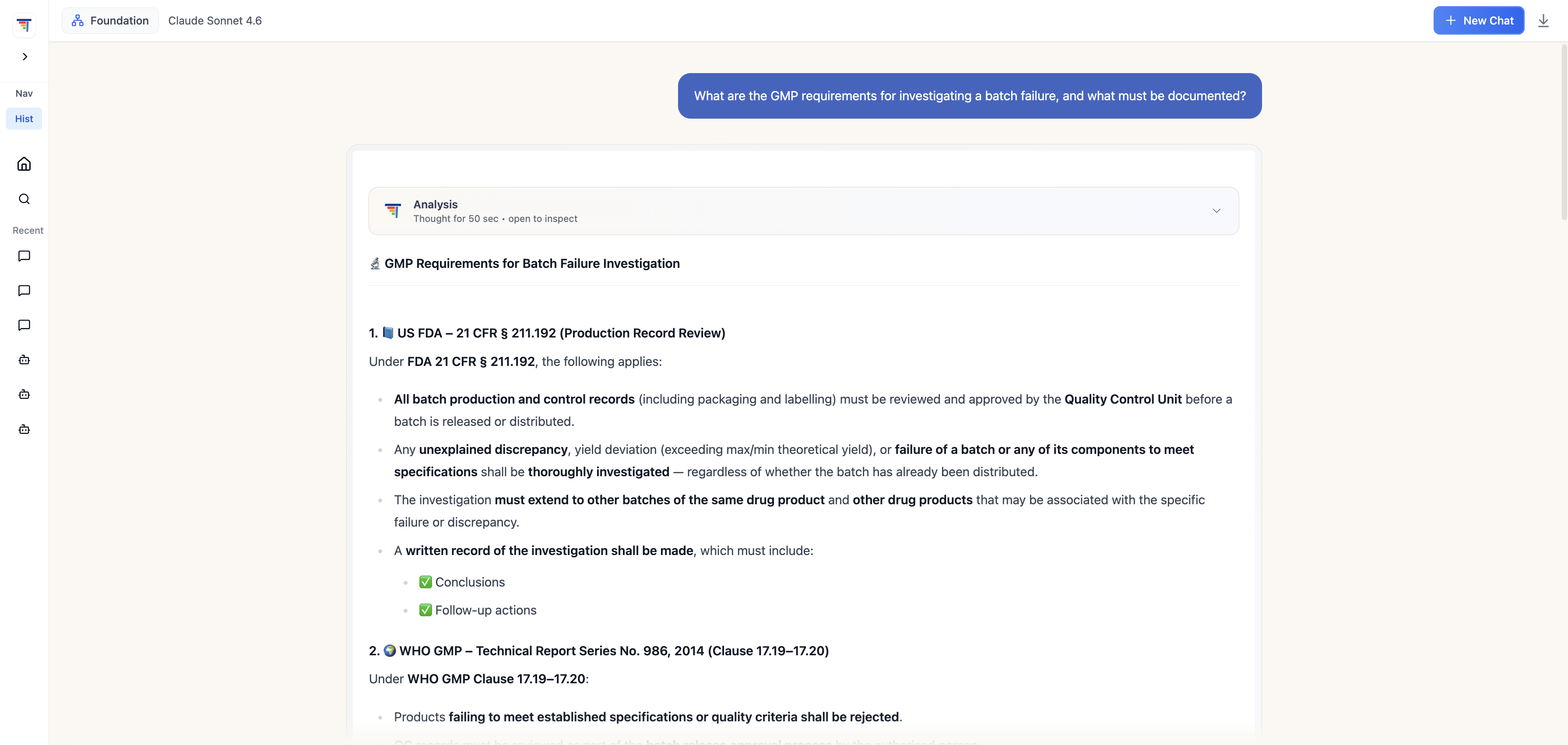
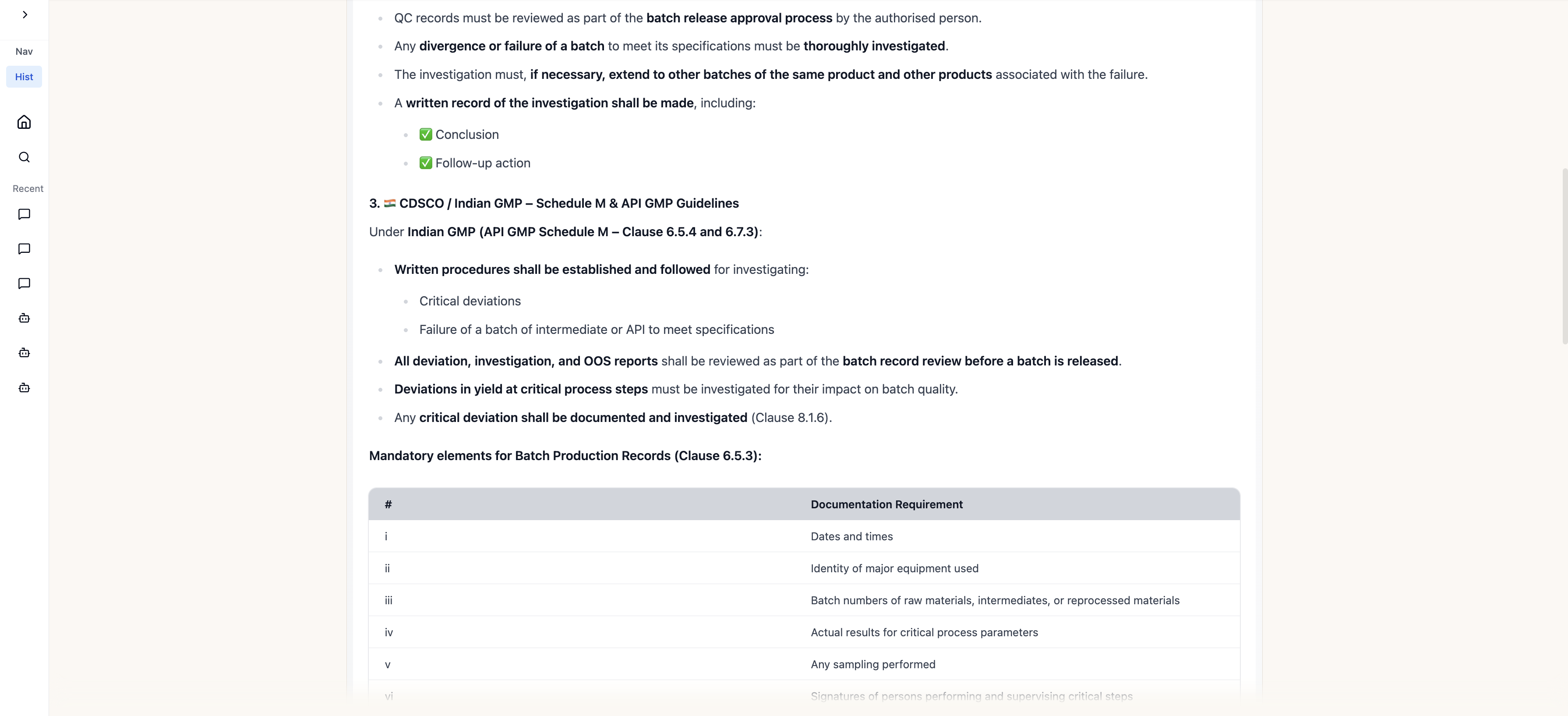
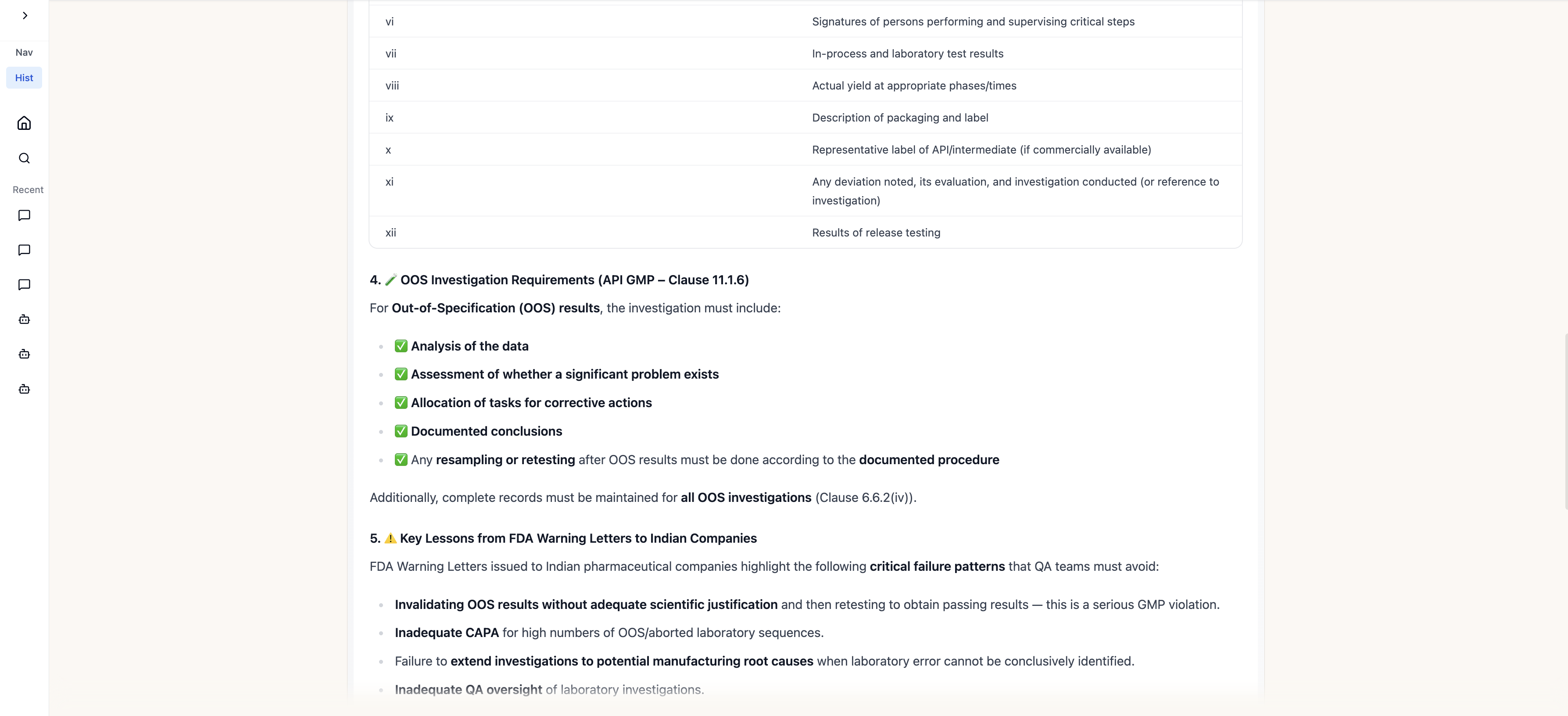
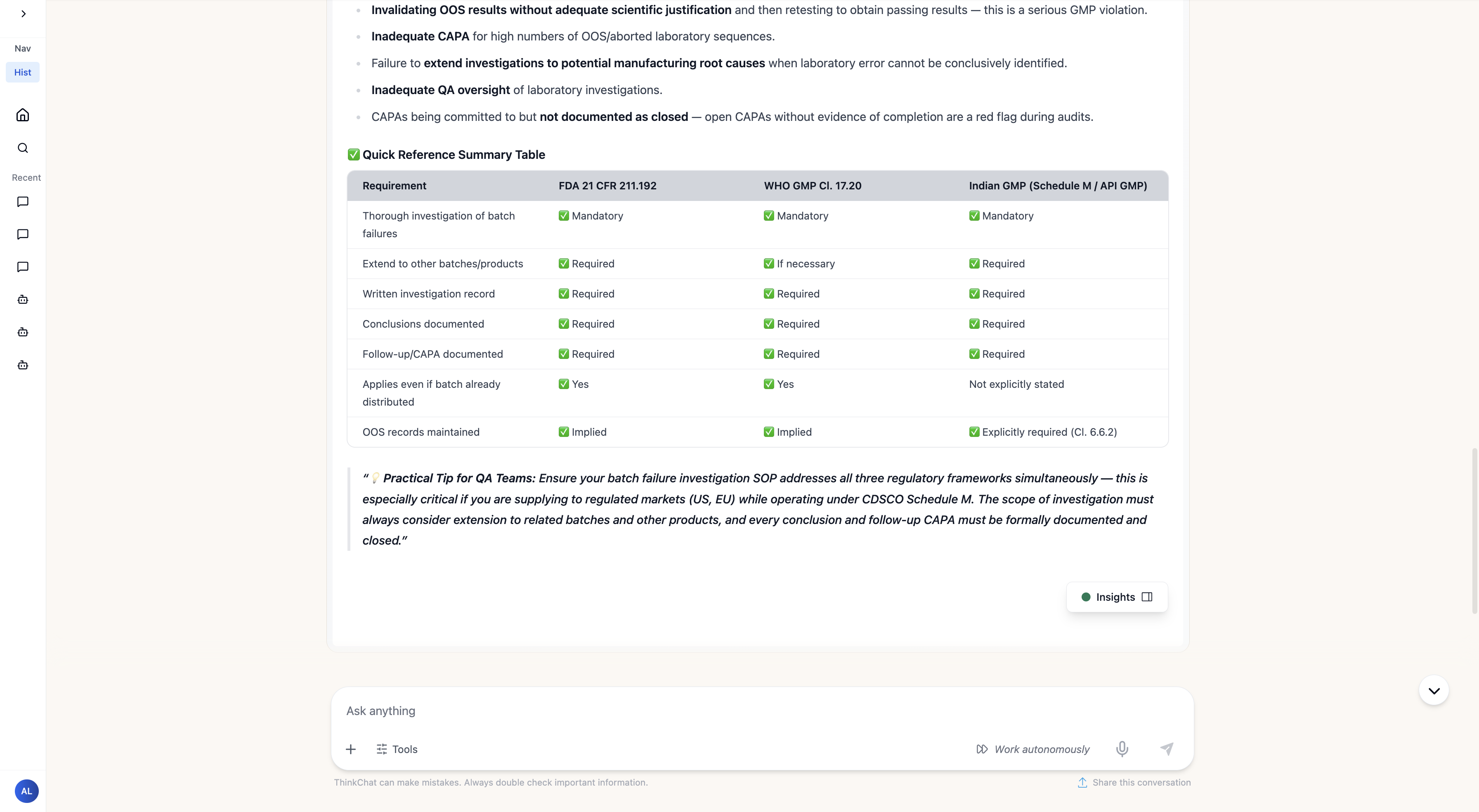
Question submitted & FDA 21 CFR § 211.192 — batch failure investigation requirements
Inside ThinkStack — The Flow
Every agent in PICA is built as a visual flow in ThinkStack. The Regulatory Compliance Agent connects a Flow Input node to an LLM node (RegulatoryExpert) to a Flow Output node — grounded in the KB. The Test Flow panel on the right shows a live response to an EMA batch certification question, structured and cited in real time.
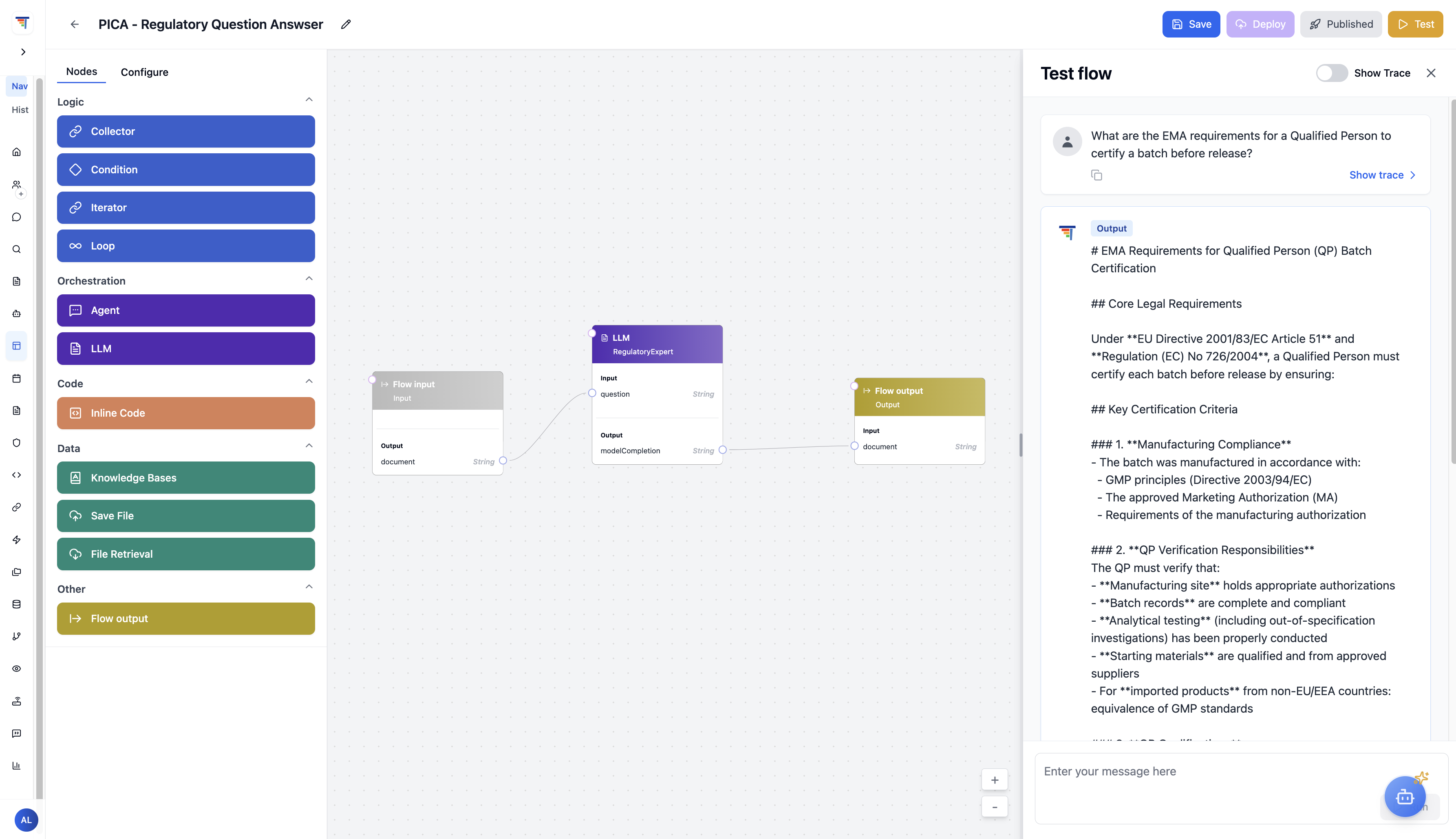
The PICA Regulatory Question Answerer flow in ThinkStack: a three-node flow (Input → LLM/RegulatoryExpert → Output), with a live test panel showing an EMA Qualified Person batch certification response — structured, detailed, and grounded in source documents.
Every Monday morning at 07:00 UTC, the PICA Pipeline fires automatically. No one starts it. No one builds the query. No one formats the output. By the time the quality team arrives at their desks, a full CAPA compliance snapshot is already waiting in the ThinkTrends Dashboard — generated, structured, and ready to act on.
How It Works
Three Airflow tasks run in sequence, each passing its output to the next:
Queries the Supabase live database for all Open and In Progress CAPA records — every entity, every site, no filters omitted.
Counts records by severity (Critical / Major / Minor), site, and deviation type. Flags anything overdue based on due date comparison. No manual triage required.
Formats the computed stats into a structured weekly compliance summary with overdue flags clearly marked. Logs the output and ingests it into the ThinkTrends Dashboard.
What Gets Produced
A Weekly CAPA Compliance Report with total open CAPAs, in-progress count, overdue items with severity breakdown, site-level distribution, and deviation type categorization. The ThinkTrends Dashboard provides weekly compliance snapshots, overdue tracking, and site-level drill-down — updated automatically, every week, without anyone being asked.
The report is not just a data dump. Each line identifies the specific CAPA record, its deviation type, how many days it is overdue, and its severity rating — giving the quality team exactly what they need to prioritize Monday morning without sorting through a spreadsheet first.
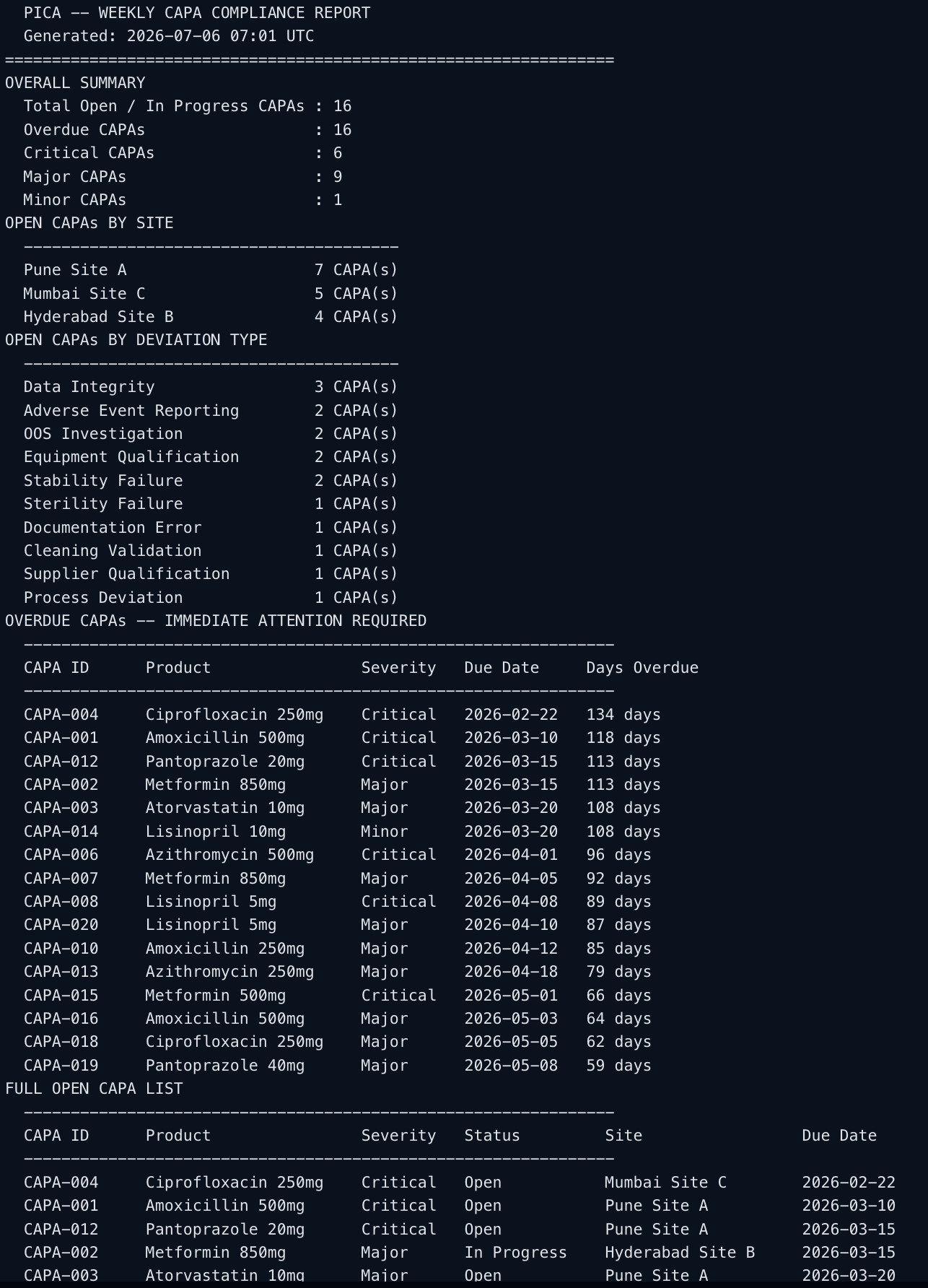
Actual output from the PICA Weekly CAPA Compliance Report pipeline — generated automatically at 07:01 UTC on July 6, 2026. 16 open CAPAs, 16 overdue, broken down by site and deviation type with days overdue for each. No one triggered it.
Built-In Quality Scoring
The pipeline doesn't just run — it is held accountable. PICA's Agentic Governance layer runs evaluation jobs against the Regulatory Compliance Agent, scoring every response across 6 ground-truth Q&A pairs. Scores range from 0.35 (response addresses the topic but misses specific citations) to 1.0 (fully cited, document-grounded, no hallucination). The average score, high/low distribution, and per-trace rationale are all visible in a single dashboard view — so quality drift is caught before it becomes a compliance risk.
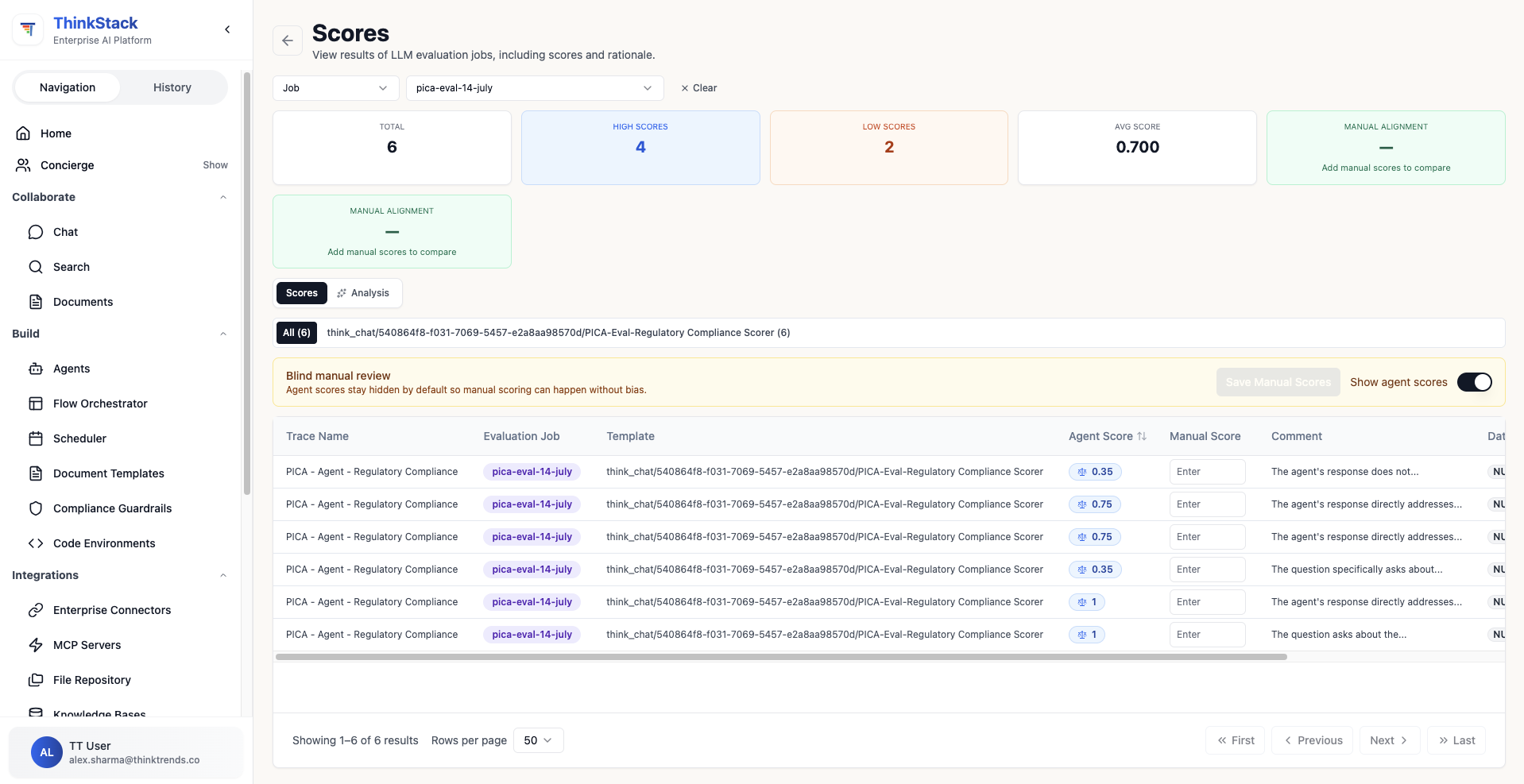
The ThinkStack Evaluation dashboard for pica-eval-14-july: 6 traces scored against the PICA Regulatory Compliance Scorer — 4 high scores, 2 low scores, avg 0.700. Each trace shows the agent score, a comment on the rationale, and is available for manual alignment review.
Writing an SOP from scratch takes a trained professional hours of cross-referencing manuals, past documents, and institutional style guides — and a single formatting error or missing clause can cause an audit finding. This use case collapses that process to roughly 4 minutes: a lab technician requests a document in plain English, and two agents working in sequence produce a polished, fully cited draft grounded in the lab's own reference materials, formatted to institutional standards from the first generation.
How It Works
Laboratory staff upload manuals, past documents, and reference materials to a secure AES-256 encrypted document repository. These become the knowledge base the agents draw from.
The user specifies the procedure, use case, and document type in natural language — e.g., "Generate a batch record form for leukapheresis processing following our standard GMP format." No templates to fill out. No form to submit.
The Document Generation Agent retrieves the relevant manuals, past documents, and style/structure guides from the Knowledge Base, then generates a polished document compliant with business requirements and institutional formatting rules.
A dedicated QA Agent assesses the draft for factual correctness and adherence to business rules. It makes required edits and flags any sections that need human review before the document is finalized.
The completed document — with relevant references to source materials — is ingested into the ThinkTrends Dashboard. Document inventory, version history, and full audit trail are maintained automatically.
What Gets Produced
A complete, polished document — SOP, Batch Record Form, or Certificate of Analysis — grounded in the lab's own manuals and past work, formatted to institutional style, with source references cited throughout. The agent doesn't just fill in a template: it reads the relevant technical manuals, understands the procedure, and structures the document section by section — Purpose, Principle, Scope, Responsibilities, Materials, and step-by-step procedure — exactly as your institutional guidelines specify.
The ThinkTrends Dashboard tracks every version and every edit. Laboratory staff and auditors always know which source documents were used, which agent generated each section, and when each revision was made — a complete, inspectable audit trail from request to final approval.
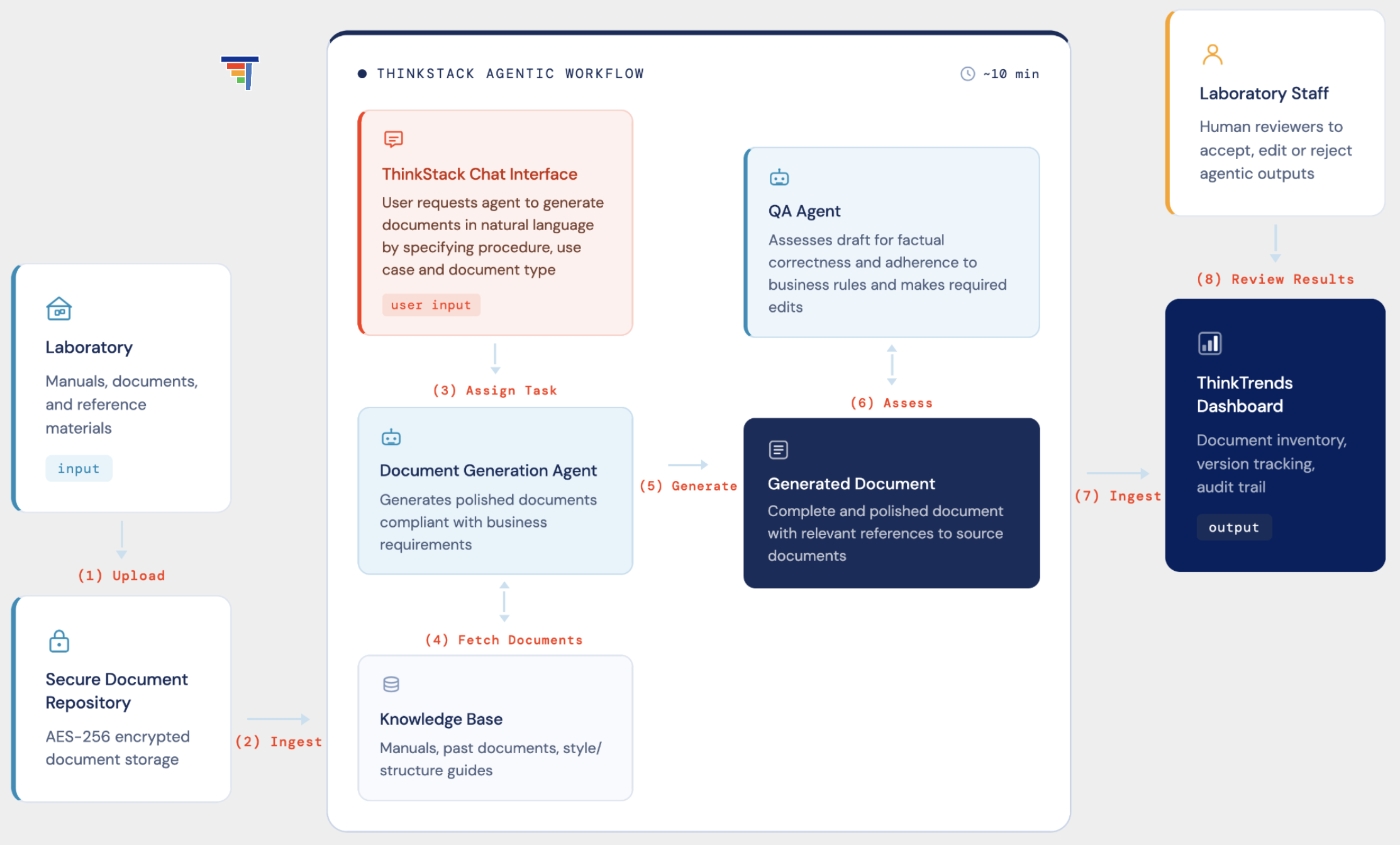
The SOP and COA generation workflow: lab staff upload manuals to a secure repository, the Document Generation Agent drafts grounded in the knowledge base, the QA Agent reviews for compliance, and every output lands in the ThinkTrends Dashboard with full version tracking and audit trail.
Live Demo — MSKCC SOP in ThinkStack
The screenshot below shows this use case running against real MSKCC Cell Therapy Laboratory documents. The agent has ingested three source documents — a TRCab-D19-CD45 Depletion SOP, a Miltenyi LP-TCRab-19-45RA User Manual, and a CTL Research TAAT-TRT Manufacturing Procedure — and is drafting a complete, MSKCC-compliant SOP for the LP-TCRab-19 Depletion process. The document editor on the left shows the structured output already formatted to institutional standards. ThinkChat on the right shows the agent confirming which documents it has access to and asking for approval before drafting.
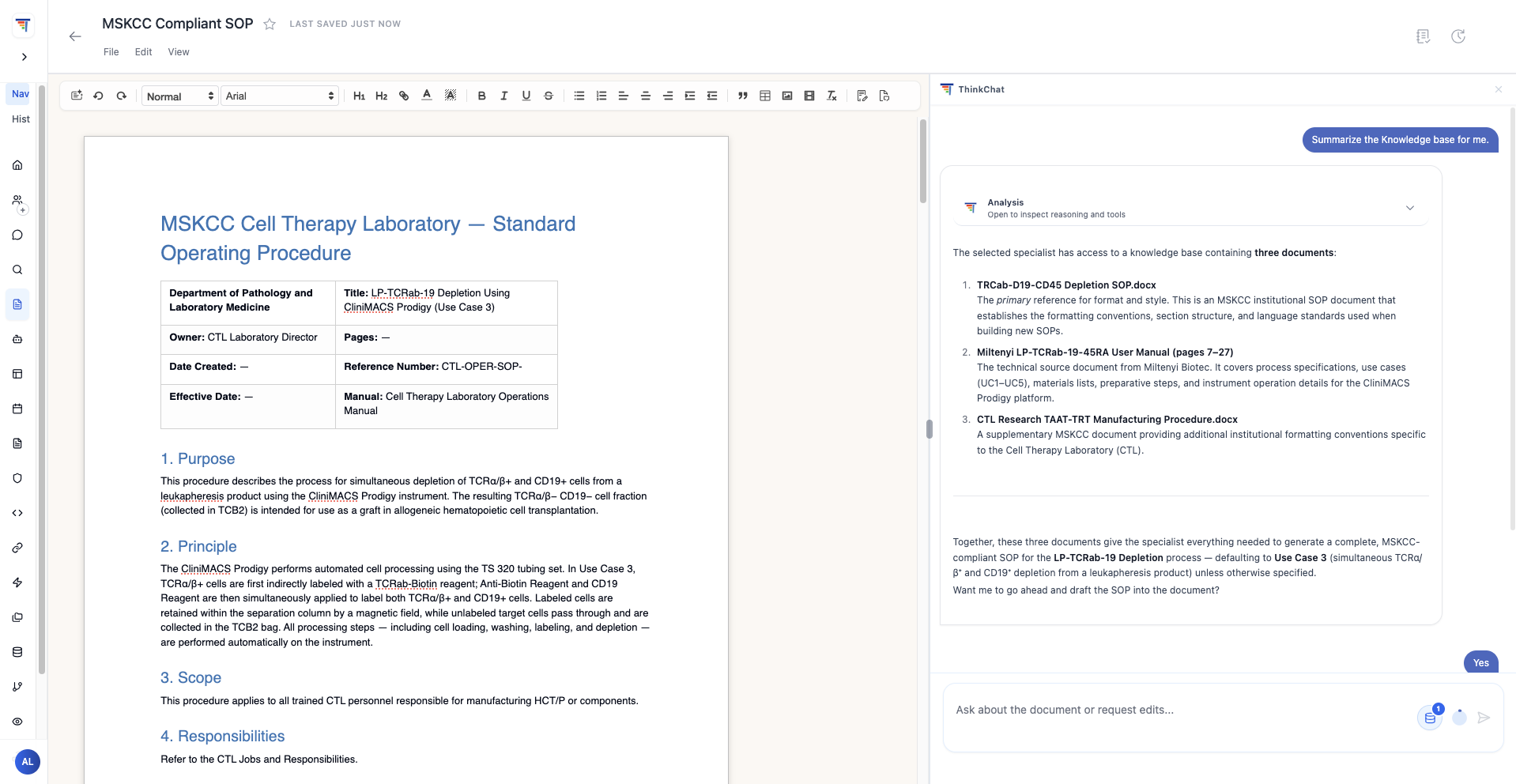
Live demo: an MSKCC-compliant SOP for LP-TCRab-19 Depletion being drafted in ThinkStack, grounded in three uploaded lab documents. The agent has summarized the knowledge base and is ready to draft on confirmation — human oversight at every step, document generation in minutes.
And This Is Just the Beginning
PICA demonstrates that pharma compliance intelligence can be automated, grounded, auditable, and deployed at scale — without replacing human judgement. What was built here is a working system: real knowledge bases, a live database connection, an always-on evaluation layer, and a pipeline that runs every Monday without being asked. Everything runs on ThinkStack and can be adapted to your specific regulatory environment, data sources, and workflows.
- Connect your real regulatory documents.
Replace the mock knowledge base content with your actual SOPs, audit records, CAPA histories, and regulatory submissions. The agents work the same way — grounded in your data.
- Connect your live manufacturing database.
Replace the mock CAPA dataset with your actual quality management system. The MCP server queries live records in real time regardless of database size or structure.
- Extend to more regulatory bodies.
Add jurisdiction-specific knowledge bases — PMDA for Japan, TGA for Australia, Health Canada — so the same agent infrastructure covers your full global compliance footprint.
- Integrate with existing workflows.
Connect via Slack, email, or Jira so compliance alerts and CAPA reports reach the right teams automatically — without anyone logging into a separate tool.
The result is a compliance system that handles the research, the monitoring, and the reporting — so the people who matter can focus on decisions, not documents.