Your AI Workforce,
Always On.

Deploy persistent AI agents that understand your business, work across enterprise tools, collaborate in parallel, and complete work from start to finish.

Everything You Need in One Place!

Reports, diagrams, live analysis, and a full trace of everything an agent did — all in the same place your team already works.

ThinkStack Workspace
Iris Orchestrator · Multi-Agent Session Active
Guardrails Active
Jira
1 Blocker
Pull this week’s blockers and draft the standup update.
Found 3 blockers, 1 Highest priority since yesterday.
standup-brief.md
3 blockers · ready
Calendar
Resolved
Do I have any conflicts on Thursday afternoon?
Two overlapping invites at 3pm. Moved team sync 30 minutes later — no more conflicts.
Synced to Google Cal
Thu 3:30pm · Clean
Google Drive
Saved
Find last quarter’s pricing deck and update the cover slide.
Found in /Shared/Sales. Cover updated with Q2 verified numbers.
pricing_q2.pptx
saved back to Drive
Reports & Trends
Flagged
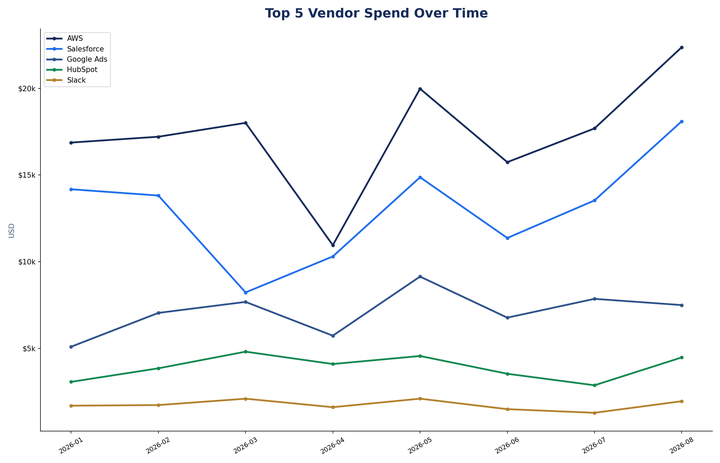
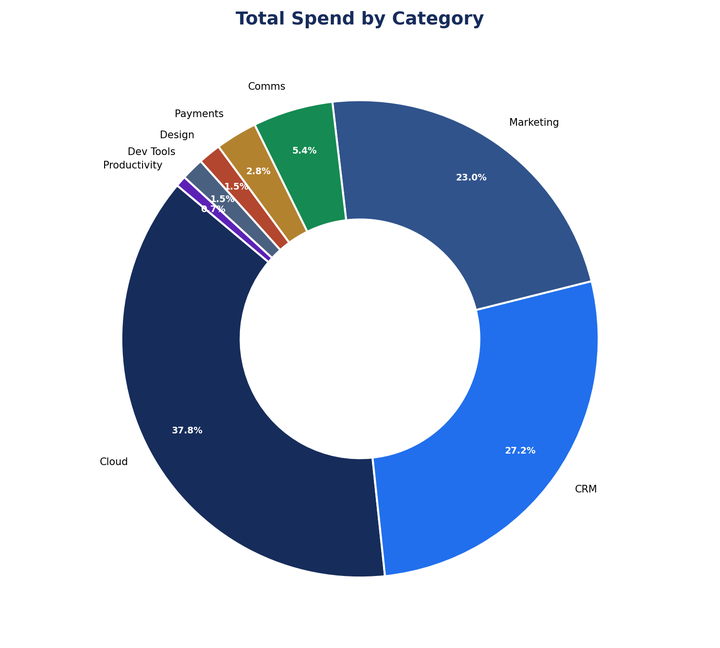
Chart the spend trend and flag anything unusual.
Spend is up 18% in Ops, mostly one vendor. Chart and analysis attached.
spend_trend.xlsx
1 chart · 1 flagged vendor
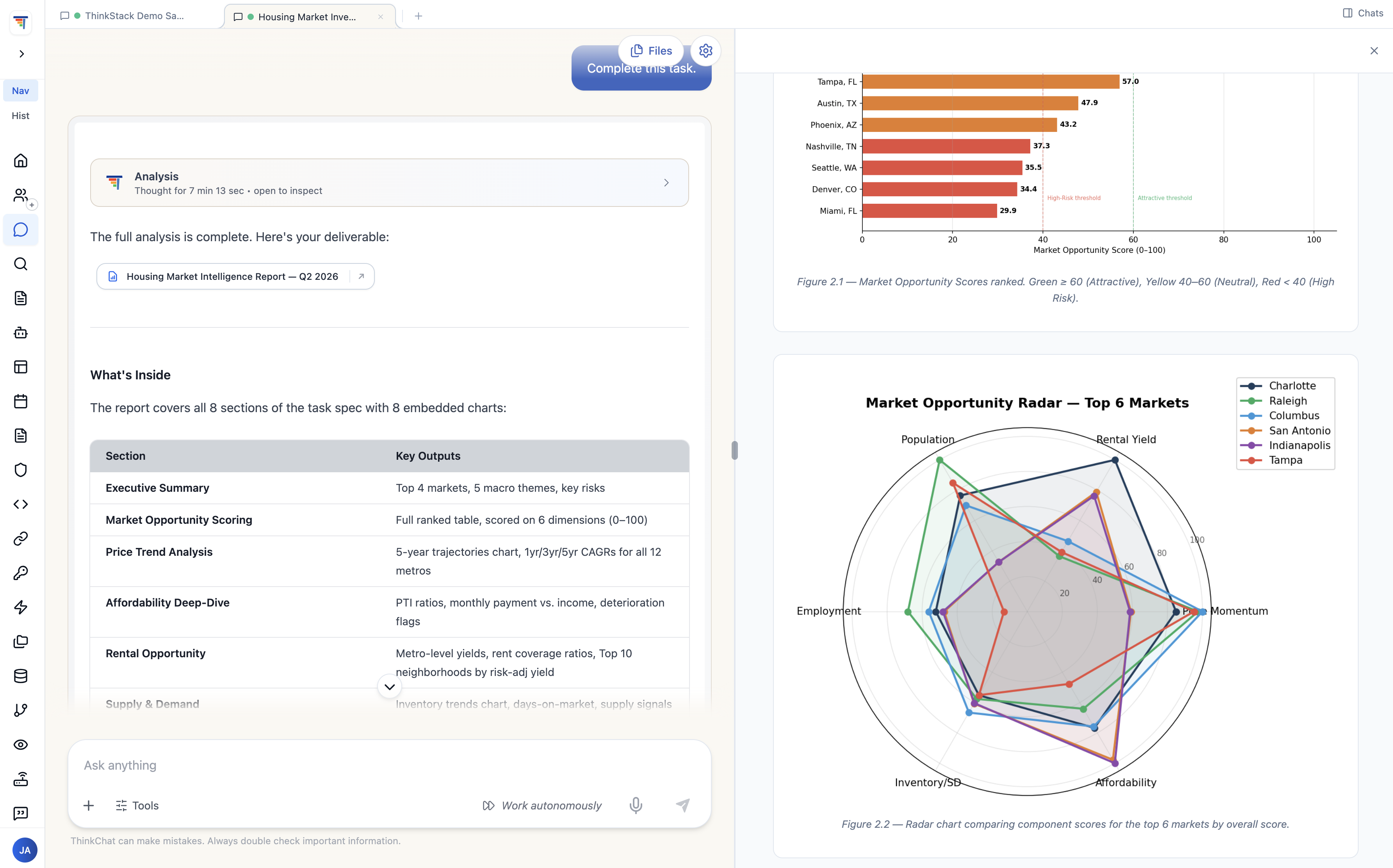
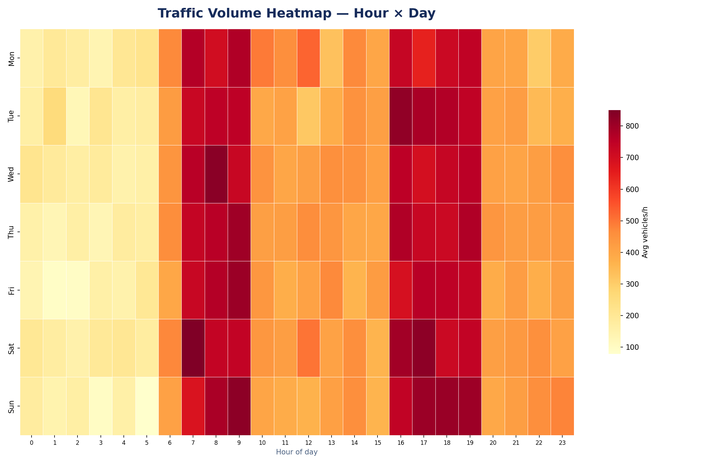
A finished report with ranked market-opportunity scores and a radar chart comparing top markets
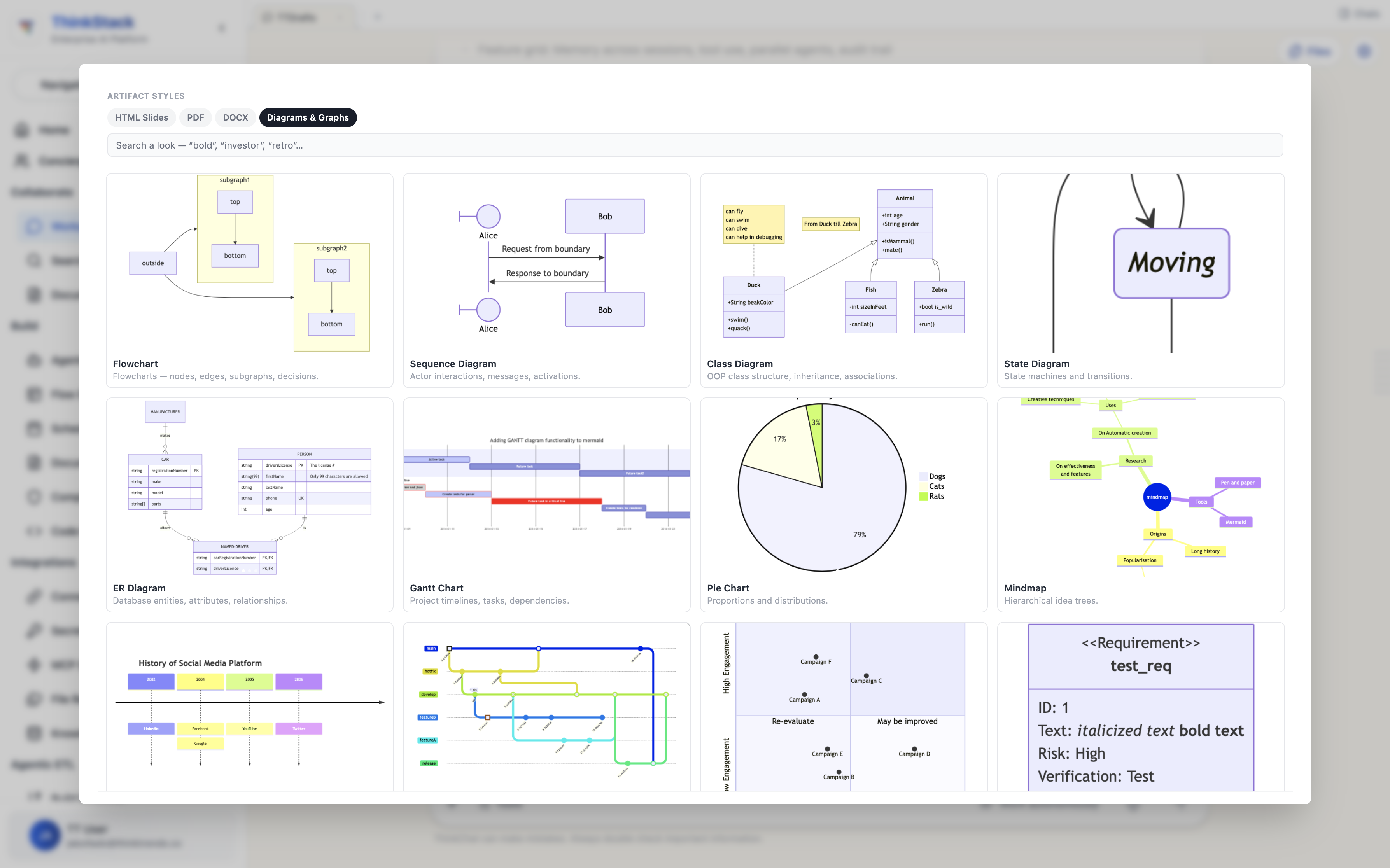
Selecting from existing diagram and template styles — flowchart, sequence, ER diagram, Gantt, pie chart, mindmap
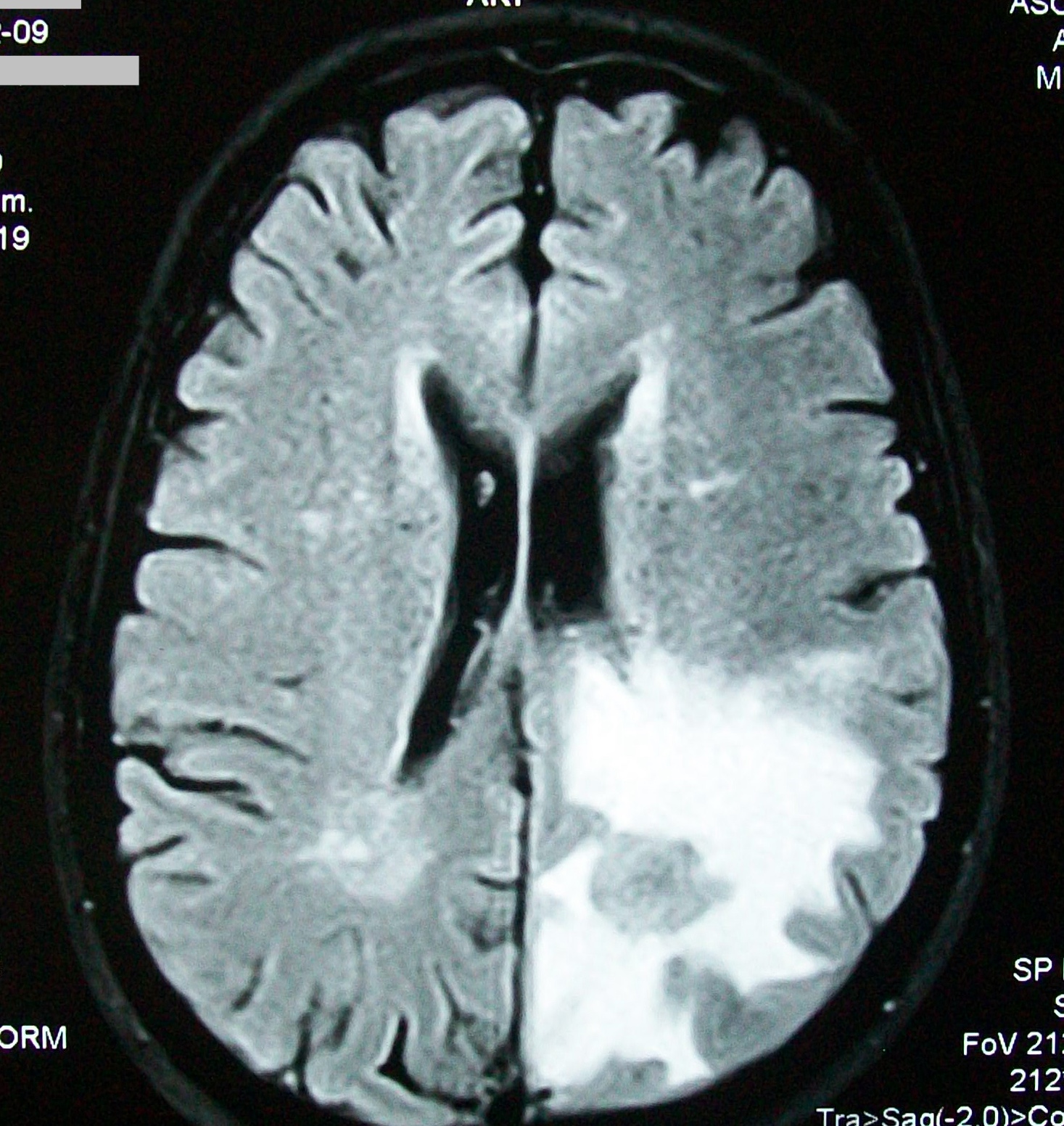
MRI Brain Scan 280 Scans Ingested
Multi-Modal Dataset Ingestion
MRI, CT & histology scans unpacked, normalized, and label-verified autonomously.
Training Run
XGBoost · 84 Rnds
Train a classifier and cross-validate it — pick what’s right.
Selected XGBoost with 5-fold CV. Tuning converged in 84 rounds.
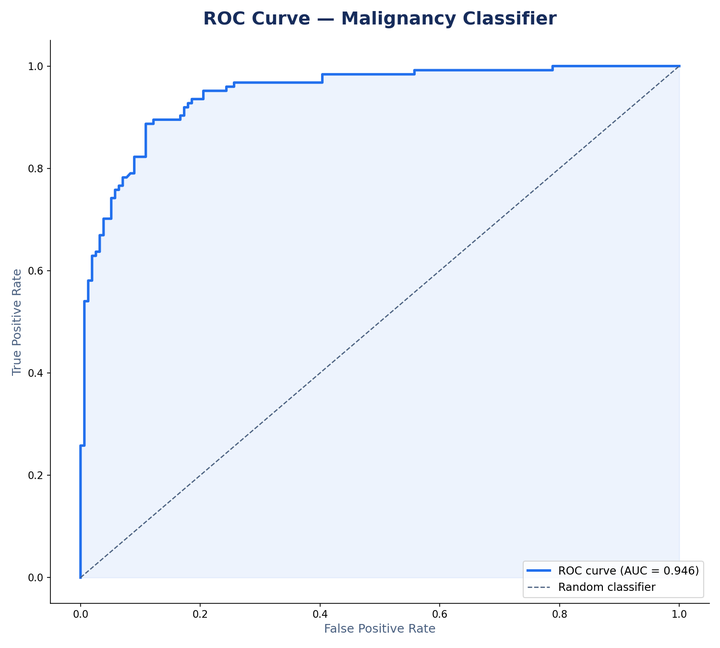
Test AUC0.990
Accuracy96.4%
Recall95.4%
Clinical Validation
Threshold Met
124 true positives, 6 false negatives across 130 malignant cases — safely inside the recall bar for clinical review.
model_report.pdf
ROC · matrix · audit
Deterministic Trail
100% Traceable
Every prediction traces back to the specific feature that drove it — fully reproducible and auditable.
Tumor Volume (0.34) Texture Edge (0.28) Signal Ratio (0.19)
Trace #TR-8842 · Autonomous Execution
59 Steps Completed in 3m 48s
Plan & Source Decomposition
Identified 5 required integrations: Google Calendar, Gmail, Slack, Jira, and Google Drive. Spawned parallel retrieval workers.
Tool Invocation & Ingestion
26 read · 11 search · 22 write
Read calendar: 2026-09-03 → 2026-09-10 142ms
Search Jira: status = 'Blocked' ORDER BY priority 218ms

Search Slack: launch|blocker|incident|escalation 94ms
Read Drive: /Shared/Sales/pricing_q2.pptx 186ms
Output Generation & Delivery
Verified
Compiled weekly standup brief with 3 blockers, reconciled calendar syncs, and attached spend trends.
Weekly_Executive_Brief_Q3.pdf
4 pages · 1.4 MB · Ready

From request to finished work.

One orchestrator. Multiple specialists. Parallel execution. One deliverable.

Understand. Maintains context across conversations, sessions, and ongoing work.

Plan. Breaks complex objectives into tasks and determines what needs to happen.

Act. Uses connected enterprise apps to search, create, communicate, and execute.

Deliver. Returns finished work — reports, documents, messages, decisions, and actions.

Work Doesn't Start Over Every Morning.

Enterprise work spans multiple conversations, users, documents, and weeks. Persistent agent workspaces preserve the context required to continue the work — not treat every request as a blank slate.

Shared file system. Files, folders, and outputs shared across chats, projects, and people.

Continues where you left off. Pick up Monday's analysis on Thursday with all context intact.

Team-wide access. Multiple users and agents collaborating within the same workspace.

S3
Snowflake
BQBigQuery
Postgres
Google Drive
ThinkStack workspace

Analyze the latest sales data from our warehouse and create a summary by region.

Connecting to warehouse
Loading data (12.4M rows)
Running analysis
XLSX
DOCX
PDF
Marketing TeamCan access
Sales TeamCan access
Finance TeamCan access

Agent & user shared filesystem — files persist across all conversations

Built for enterprise. Designed for control.

Powerful enough for complex workflows. Observable enough for production.

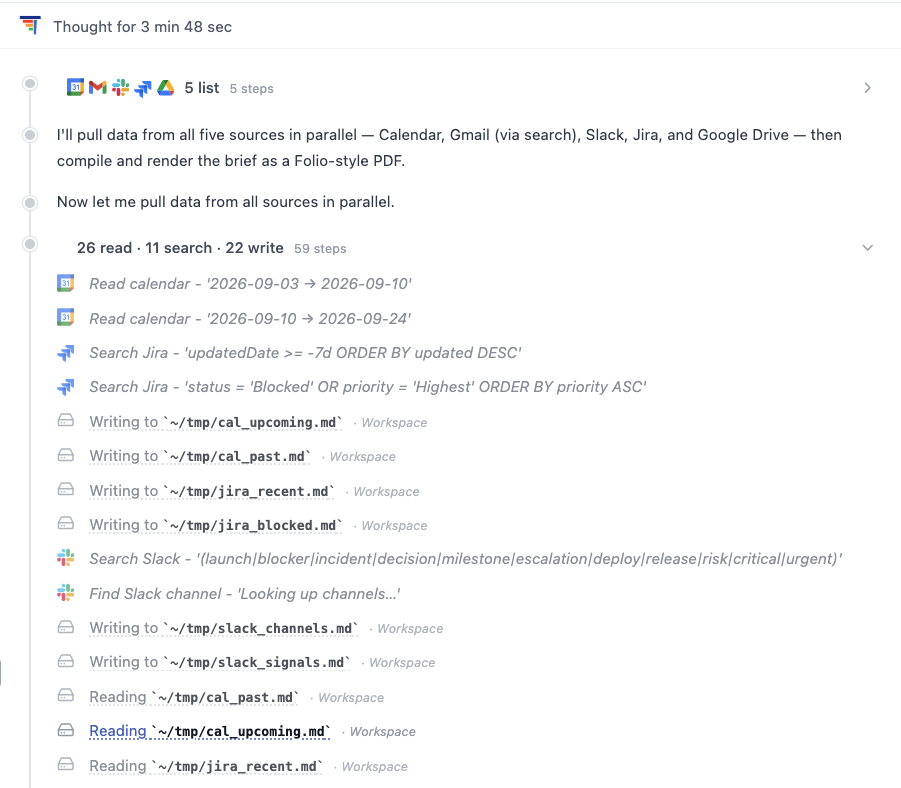
Full Execution Visibility

Every agent decision, delegated task, tool call, input/output, and timing is traced. See what happened, when, and which agent did the work.
✓ Agent decisions logged
✓ Complete audit trail
✓ Execution timeline
Agent execution trace — reasoning, parallel tool calls across Calendar, Gmail, Slack, Jira and Drive, and every file written

Permission-aware Execution

Agents operate through the permissions and connections available to them. Give agents access to what they need — and nothing more. Guardrails enforced at every step.
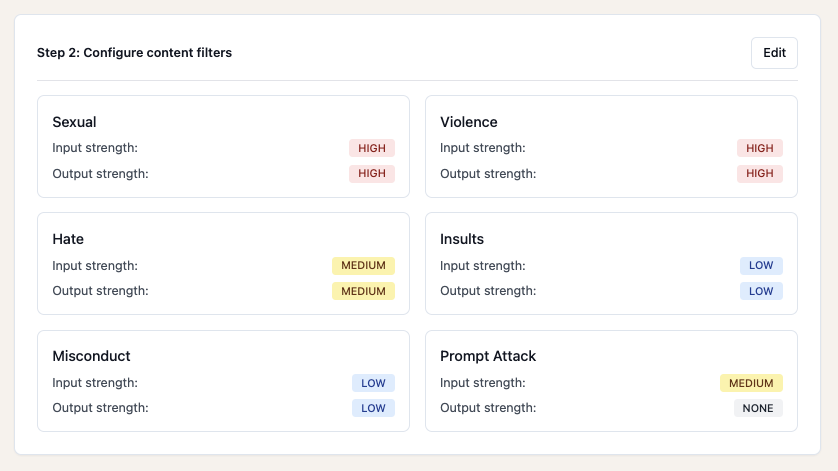
Guardrails active
Permission-aware guardrails configuration

Human-in-the-Loop

Not every action should be autonomous. For sensitive workflows, agents pause and request approval before acting. Autonomy where appropriate. Approval where necessary.
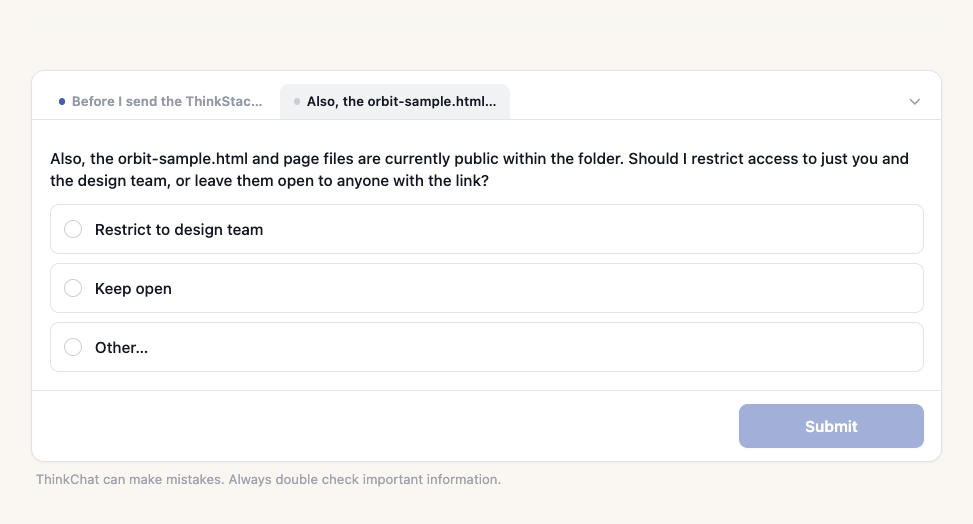
✓ Approval gates
✓ Sensitive action flags
✓ Configurable thresholds
Agent pausing mid-task to ask whether generated files should be restricted to the design team or left open

AI Shouldn't Just Answer Questions.
It Should Own the Work.

Most enterprise AI is still a chatbot: ask a question, get an answer, copy the result, switch apps, take action — manually. That breaks down the moment work spans multiple systems.

BEFORE

The Chatbot Era

Four manual handoffs before anything is finished — and you are every one of them.

  1. 1 Ask a question
  2. 2 Copy the result
  3. 3 Switch apps
  4. 4 Take the action yourself

You are the integration layer.

AFTER

The AI Workforce

One request in, finished work out. The handoffs happen without you.

  1. ✓ Understands the request
  2. ✓ Works across your systems
  3. ✓ Coordinates specialists in parallel
  4. ✓ Returns finished work

AI is the integration layer.

Frequently Asked Questions

Common questions about Agent Workspaces.

How is this different from a chatbot?+
A chatbot answers; a workspace owns the work. One orchestrator breaks an objective into tasks, delegates them to specialists running in parallel, and merges the results into a finished deliverable — a document, a message, a decision — rather than handing back an answer you then have to act on across four systems yourself.
Does work carry over between sessions?+
Yes. Workspaces are persistent, with a shared filesystem where files, folders and outputs persist across chats, projects and people. Monday's analysis can be picked up Thursday with context intact, and multiple users and agents collaborate in the same workspace rather than each starting from a blank slate.
What can an agent reach?+
Only what the person can. Agents work through your existing enterprise tools — calendar, mail, chat, tickets, document storage — using the permissions each person already has, with guardrails enforced at every step. Connections are configured once and shared across every agent and workspace in the organization.
Does an agent act without asking?+
Not always. For sensitive workflows, agents pause and request approval before acting, with configurable thresholds and sensitive-action flags determining what needs a human decision. Autonomy applies where appropriate and approval where necessary, rather than being all-or-nothing per agent, and pending approvals sit in the workspace alongside the work they belong to.
Can we see which agent did what?+
Yes. Every agent decision, delegated task, tool call, input and output is traced with timing, so you can see what happened, when, and which agent did the work — including across a parallel run where several specialists contributed to one deliverable.