Agentic Resource Sharing Across Teams

Organize your staff into teams that reflect your organizational structure, then collaborate on the fly by sharing agents, knowledge bases, guardrails, MCP tools, flows, and ETL pipelines with one person, one team, or everyone — instantly.

AGENTIC RESOURCE LIBRARYAGENTKBGUARDRAILMCPFLOWETLSHARE1 modelTEAMMATEYOUR TEAMWHOLE ORG
Capabilities

Built so Sharing Is the Default, Not the Exception

One Sharing Model, Six Resource Types

Agents, knowledge bases, guardrails, MCP tools, flows, and agentic ETL pipelines are all shared the same simple way — learn it once, use it everywhere.

Share with a Person, a Team, or the Whole Org

Extend access exactly as far as it should go — hand something to one teammate, open it to an entire team, or make it available company-wide.

Teams That Mirror How You Actually Work

Organize people into teams once, and every resource built inside a team is instantly easier to share within it — and just as easy to extend beyond it.

Everyone Can Put Shared Resources to Work

Anyone in the organization can run and use the agents, tools, and pipelines that have been shared with them — no setup, no waiting on a ticket.

Who Can Do What
Admin

Sets up teams and roles for the org.

Team Lead

Builds, configures, and shares resources.

Builder

Builds, configures, and shares resources.

User

Runs and uses whatever has been shared with them.

Resource Marketplace

Start from a Team-Curated Library, Not a Blank Canvas

Every organization gets a curated marketplace of ready-made agents, knowledge bases, guardrails, MCP tools, flows, and ETL pipelines built for common, org-wide use cases. Any team member can clone one and adapt it to their own needs — no one starts from zero.
✓ Curated by your admins to cover the use cases every team runs into
✓ Clone or fork any listing into your own team's workspace in one step
✓ Adapt the copy freely — the original stays untouched for everyone else
Marketplace · Organization-Wide
Expense Report Triage Agent
Org template · used by 12 teams
Clone
New Hire Onboarding Knowledge Base
Org template · used by 8 teams
Clone
PII Redaction Guardrail
Org template · used by 21 teams
Clone
Vendor Invoice Intake Flow
Org template · used by 6 teams
Clone
In the Product

The Shared Resource Library

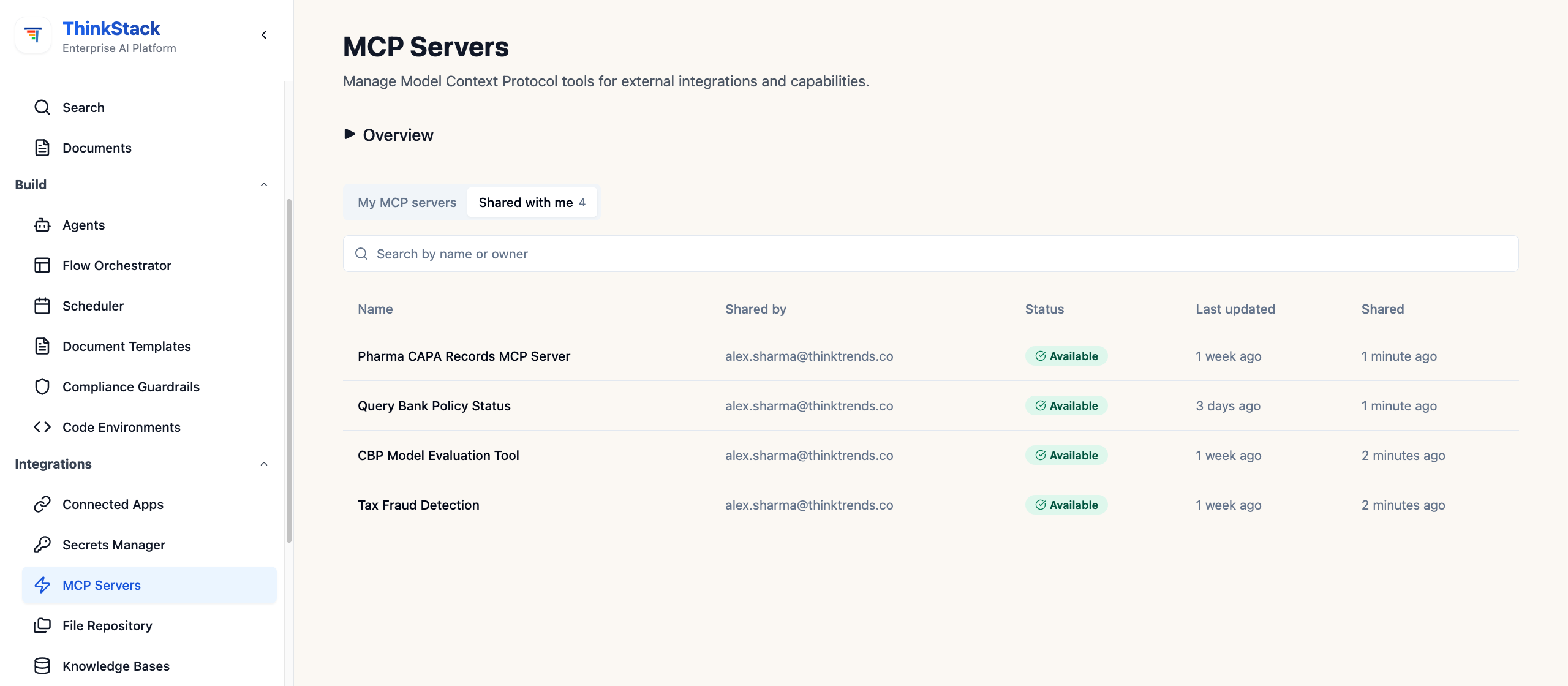
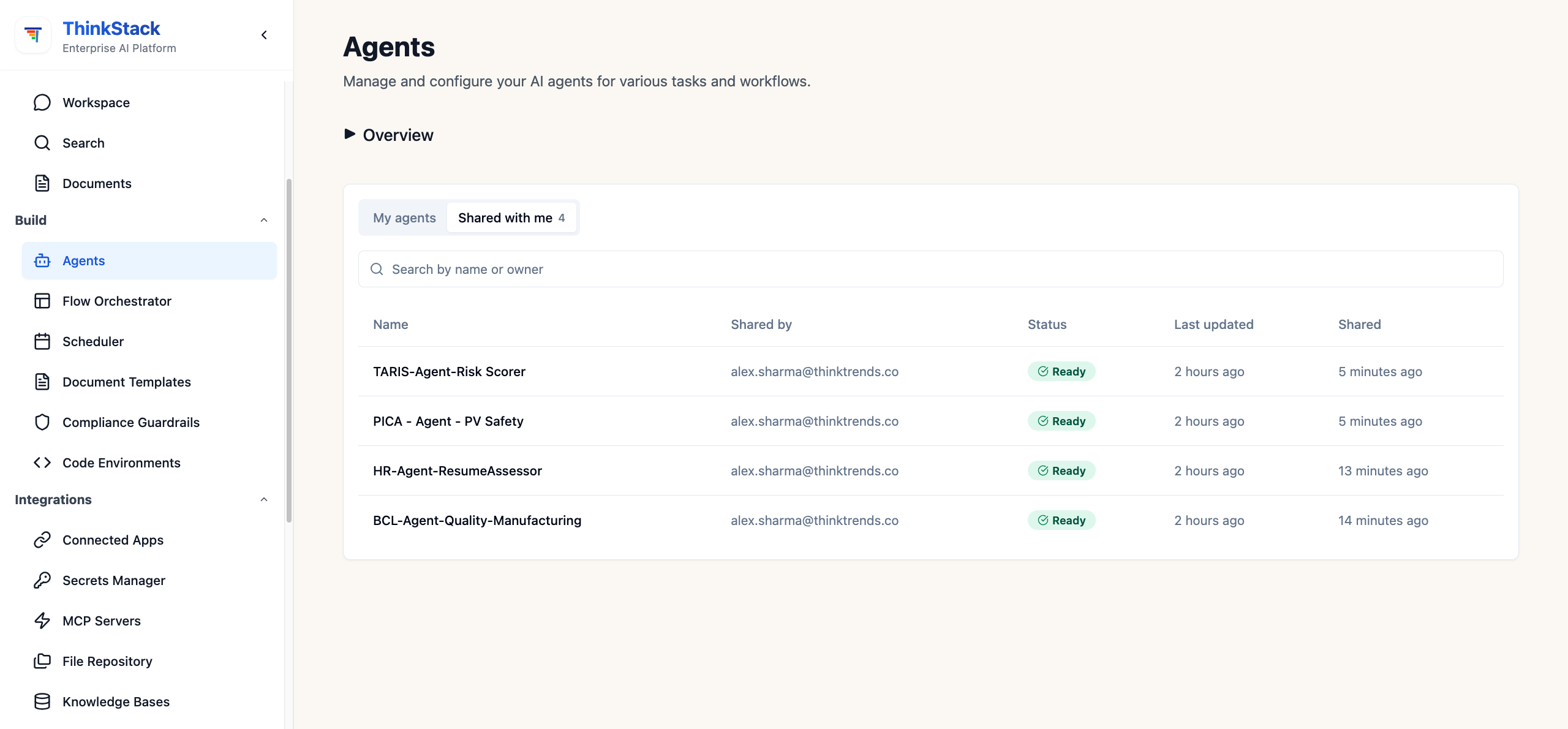
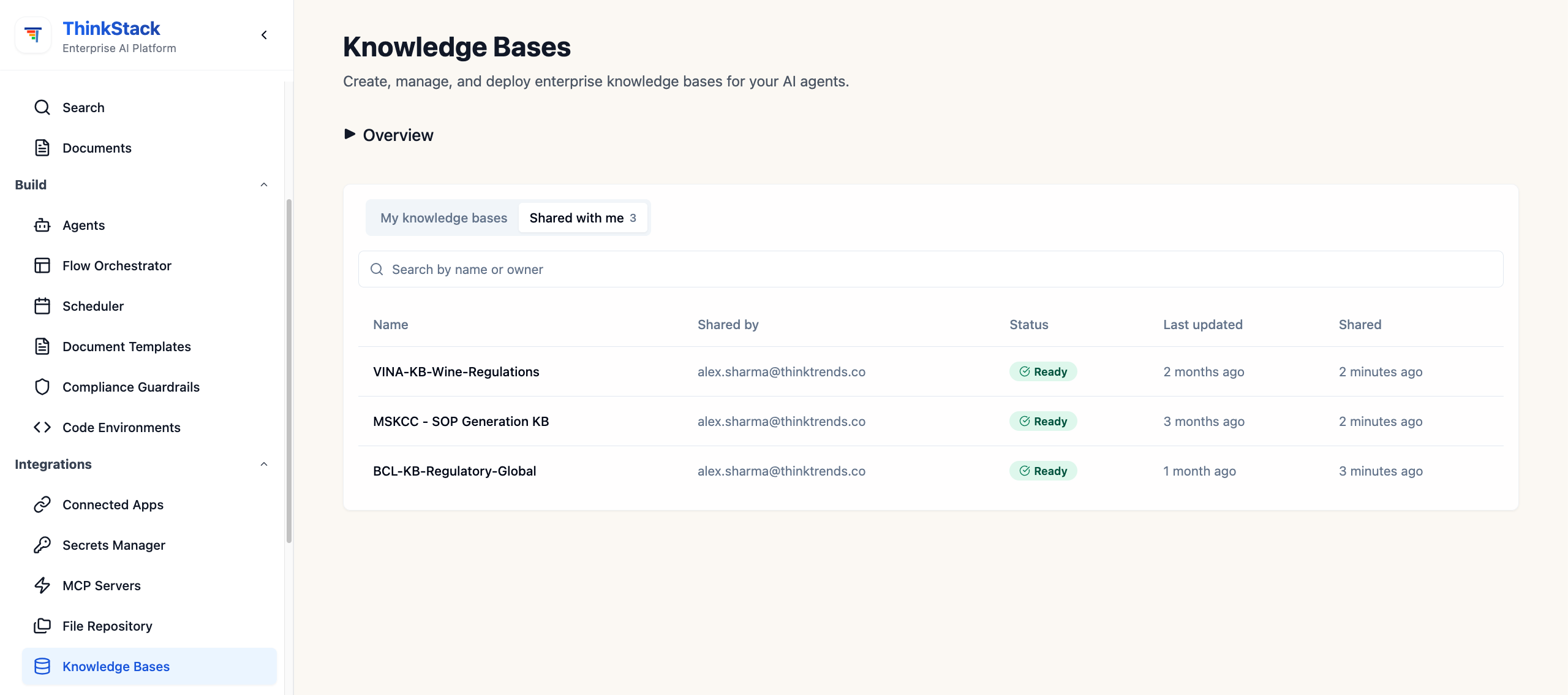
See every agent, knowledge base, guardrail, MCP tool, flow, and pipeline shared with you or your team, right where you work.

ThinkStack — Resource Sharing UI
Agents shared with me
Knowledge bases shared with me
MCP servers shared with me
Agents TARIS-Agent-Risk Scorer
shared by alex.sharma@thinktrends.co 5 minutes ago Ready 1 of 4
How It Works

Three Steps to Share Anything

1

Organize into Teams

Group people into teams that mirror how your organization actually works — by department, program, or function.

2

Build, Then Share It

Anyone who builds an agent, knowledge base, guardrail, MCP tool, flow, or pipeline can share it the moment it's ready.

3

Everyone Puts It to Work

The people it's shared with — a teammate, a whole team, or the whole org — start using it right away. No setup, no separate request.

What's Shareable
Agents — the assistants your team builds and trains
Knowledge bases — curated context agents draw on
Guardrails — policy and safety rules, reused everywhere
MCP tools — connections to your internal systems
Flows — multi-step, multi-agent workflows
Agentic ETL pipelines — data extraction and enrichment jobs

Frequently Asked Questions

What can be shared?+
Six resource types, all the same way: agents, knowledge bases, guardrails, MCP tools, flows and agentic ETL pipelines. Each can be shared with one person, one team, or the whole organization, so the sharing model is learned once and applies everywhere rather than differing per resource.
Do people have to build everything from scratch?+
No. Every organization gets a curated library of ready-made agents, knowledge bases, guardrails, MCP tools, flows and pipelines for common org-wide use cases, curated by your admins. Any team member can clone one into their own workspace and adapt it freely — the original stays untouched for everyone else.
Does using a shared resource require setup?+
No. Anyone in the organization can run and use the agents, tools and pipelines shared with them immediately — no setup and no waiting on a ticket. Teams are organized once to mirror how the organization actually works, and resources built inside a team are easier to share within it.
How do we get started?+
Three steps. Organize people into teams that mirror your structure — by department, program or function. Anyone who builds a resource can share it the moment it's ready. The people it's shared with — a teammate, a whole team, or the whole organization — start using it right away, with no setup and no separate request.