Describe the Tool. ThinkTrends
Builds the MCP Server.

No Python, no boilerplate, no deploy scripts. Tell ThinkTrends’ assistant what you need in plain English and it writes the server, wires the schema, and deploys it as a governed, agent-ready tool over the Model Context Protocol.

Book a demo
Play Video
Connects wherever your work already lives
Google Drive
Gmail
Google Calendar
Slack
SharePoint
GitHub
Notion
Jira
Confluence
Salesforce
HubSpot
Zendesk
PostgreSQL
Snowflake
AWS S3
Stripe
Linear
Microsoft Teams
Box
Zoom
+ any MCP server
Agent · live tool calls
Did the Q3 safety report get signed off, and where’s the file?
slack.search_messages(query: “Q3 report sign-off”) ✓ approved by Legal · Sep 3
drive.find_file(name: “Q3_Safety_Report.pdf”) ✓ found · /Reports/Q3/
database.query_report_status(id: “RPT-2291”) ✓ status: signed
api.get(endpoint: “/v1/signoffs/RPT-2291”) ✓ 200 OK · verified
Yes, Legal approved it in Slack on Sep 3, and the signed PDF is in Drive under /Reports/Q3/.
Slack ✓
Google Drive ✓
Your Database ✓
API Endpoints ✓
Blue gradient decorative element
Why It’s Different

You Describe It. You Don’t Build It.

Every other MCP tool still starts with a blank code editor. ThinkTrends’ assistant turns a plain-English request straight into a deployed, agent-ready server, and connects to everything else through the same protocol underneath.

No code required

Describe what the tool should do in plain English. The MCP Server Creation Assistant writes the functions, infers the schema, and lists the libraries. You never touch an editor unless you want to.

Trusted and Verified

A real handshake runs before any tool goes live, with credentials masked and failures diagnosed automatically, not just logged.

Managed lifecycle, zero ops

Hosted tools build, deploy, and health-check themselves on right-sized compute you never have to provision.

Onboarding a Tool

Two Ways Onto the Platform.

Describe what you need and ThinkTrends builds it, no code required. Already running an MCP server? Just point at it. Either way you get the same governed tool, callable by every agent.

No-Code Build

Describe It in Plain English. ThinkTrends Writes the Server.

Tell the built-in MCP Server Creation Assistant what the tool should do. It writes the functions, infers each input schema, and deploys. No editor required unless you want one.

  • No code required: describe the tool and the assistant generates it for you, function by function
  • Automatically works out each function’s typed inputs, sample values, and the third-party libraries it needs
  • Prefer to look under the hood? A full in-browser editor, GitHub import, and zip upload are right there too
  • Easily manage credentials and authorization using the secrets feature
MCP Server Creation Assistant
Build a tool that looks up adverse drug events by NDC code from our FAERS mirror.
Got it. One function, “lookup_adverse_event(ndc: str) → dict”. Writing the server now…
✓ server.py generated · FastMCP · streamable_http
python 3.13node 22fastmcpGitHub importzip upload
register tool
Google Driveconnected
Gmailconnected
Slackconnected
SharePointconnected
GitHubconnected
Custom URLconnected
Connect Existing

Already Running an MCP Server? Just Register It.

Internal or third-party: point ThinkTrends at its URL and it handles auth, health checks, and discovery from there.

  • Point to any MCP endpoint
  • Attach static credentials or an OAuth connection provider
  • Runs the same handshake test as a hosted tool before it goes live

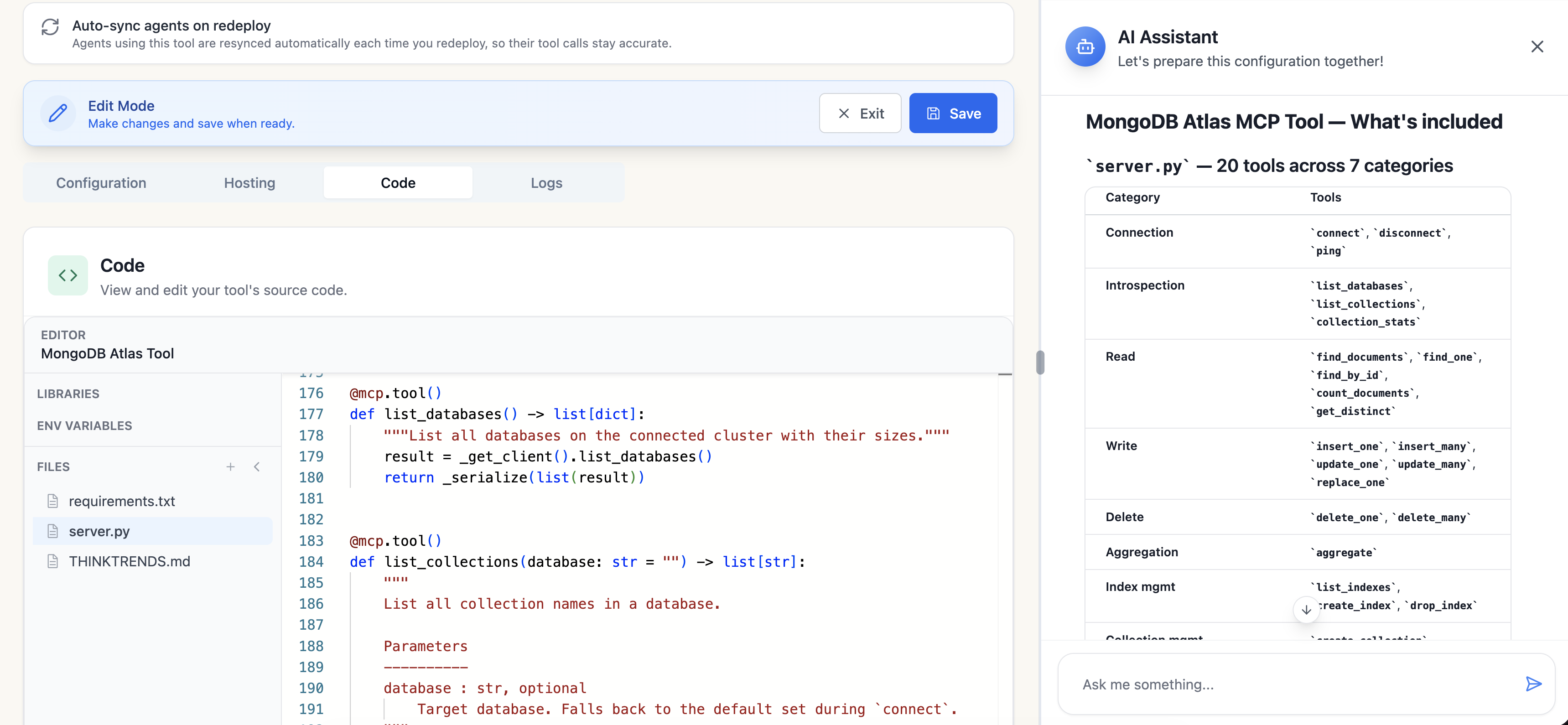
Every generated tool stays fully editable: open the code, change it by hand, and save when you’re ready.

The ThinkTrends console in Edit Mode, showing the generated server.py for a Calculator tool alongside the AI Assistant, which lists all 7 tools it registered and a Proposed Changes panel

The real console: the assistant explains what it built, tool by tool, and proposes the change for you to accept before deploying.

Before Go-Live

Trust, Verified, Not Assumed.

Every tool, hosted or connected, runs a real MCP handshake before it’s marked usable. If it fails, ThinkTrends probes the raw HTTP exchange to surface what the SDK’s error message hides.

POST /tools/test
→ opening streamable_http session…

{
  “jsonrpc”: “2.0”,
  “id”: 1,
  “method”: “tools/list”
}

headers:
  Authorization: Bearer ••••••••7f2a

← 200 OK · 3 tools returned
Handshake succeeded

Every Field You’d Need to Debug a Bad Deploy.

Duration, transport, the exact RPC method, and a masked view of the credential that was sent, recorded automatically on every test run.

Transportstreamable_http
Handshake requests2
Duration184ms
Tools discovered3

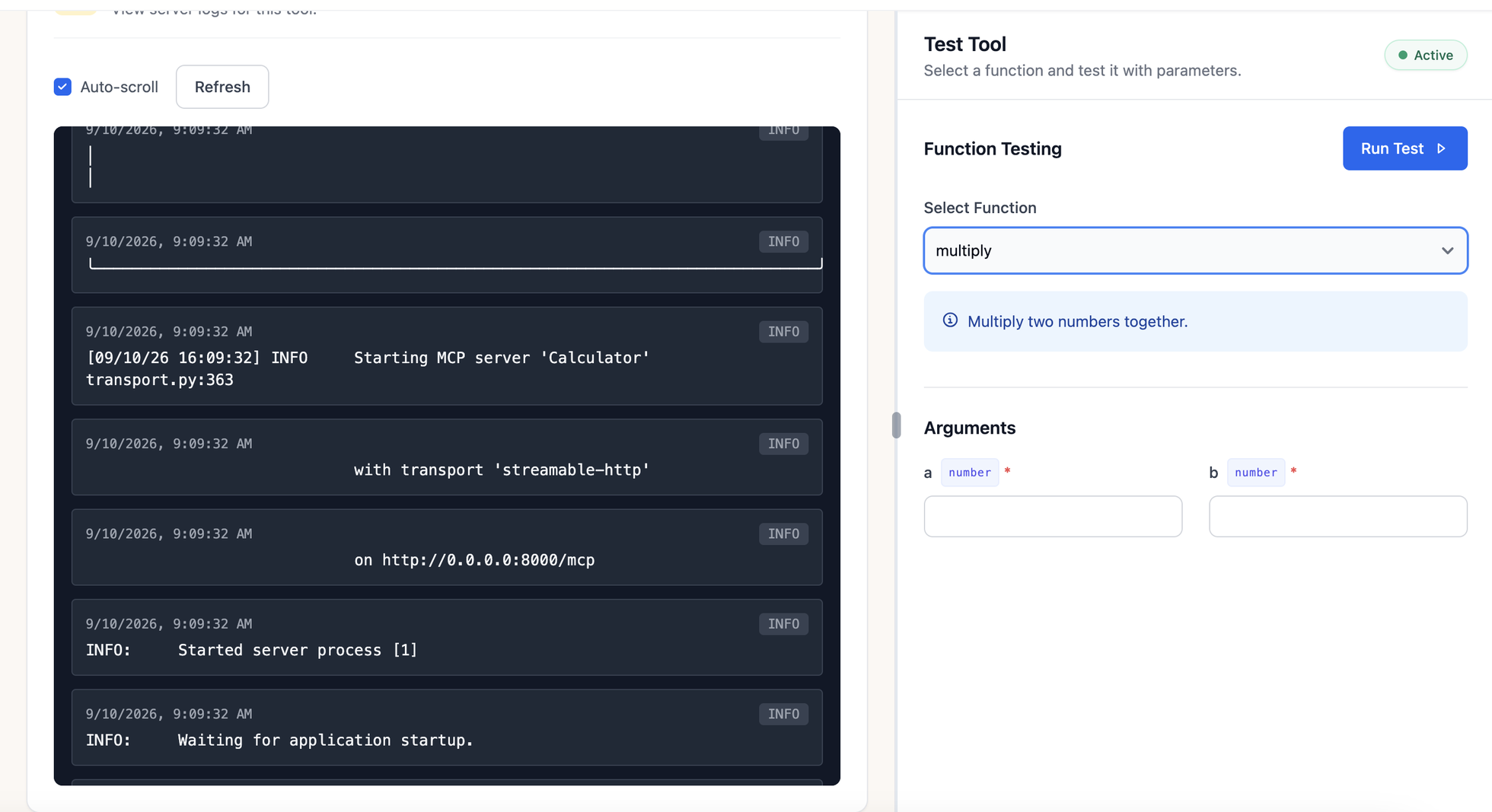
And you can watch it happen. Every tool ships with full, real-time server logs, one click away, any time.

Live server logs showing the MCP server starting with the streamable-http transport, next to the Test Tool panel

Live logs from an actual deploy: “Starting MCP server ‘Calculator’ with transport ‘streamable-http’”.

Once It’s Live

A Fully Managed Lifecycle, Start to Finish.

Hosted tools run on right-sized AWS Fargate compute, and ThinkTrends owns build, deploy, and health, so you only ever watch one status field.

01
Building
Container image built from your code, libraries, and language version.
02
Deploying
Image pushed and scheduled onto Fargate with sized vCPU / memory.
03
Provisioning
Task starts, network path and health checks come up.
04
Active
Handshake-verified and discoverable by every agent with access.

And it stays flexible after that: pause any tool at any time so you’re not paying for idle compute, then resume it and it’s back in seconds, no redeploy required.

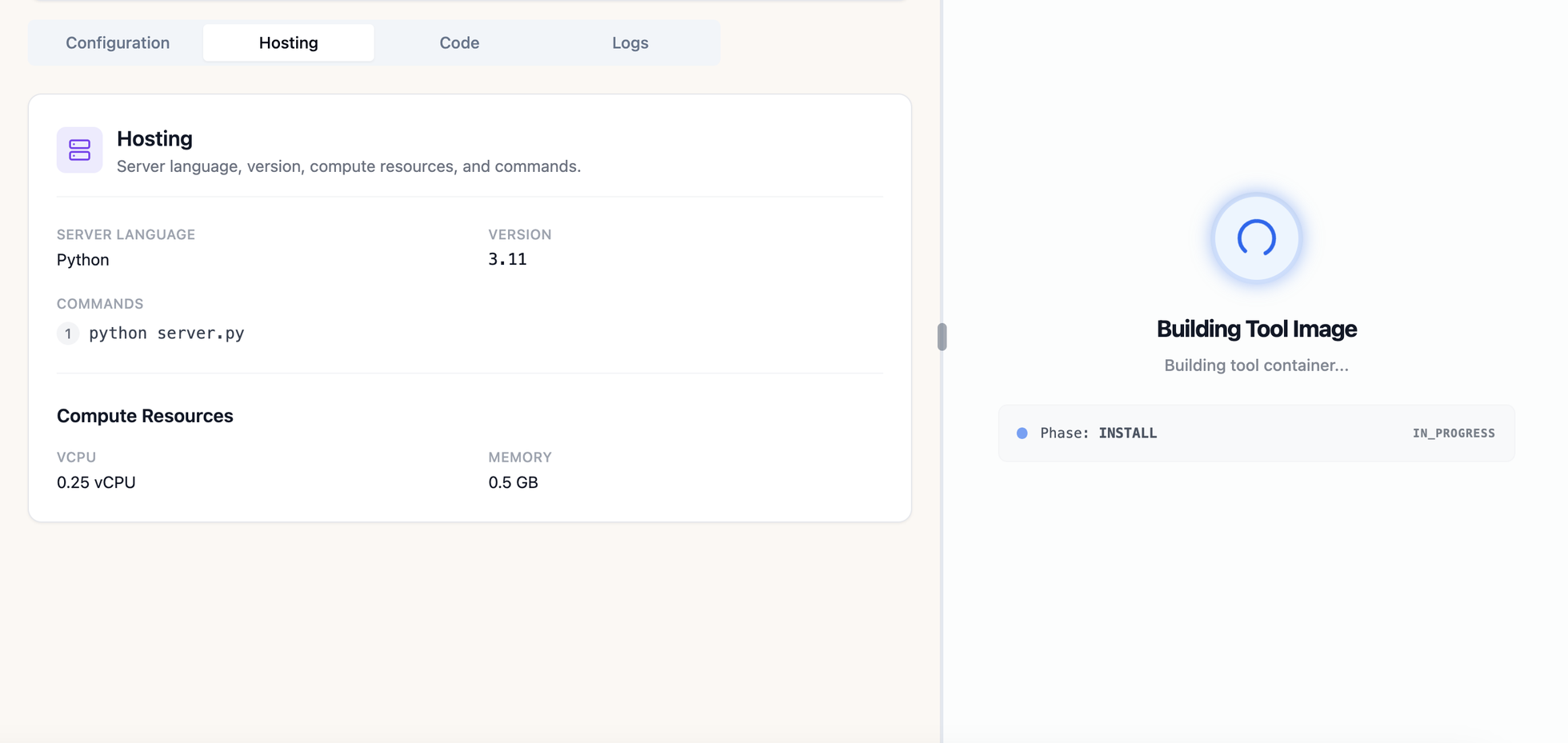
The ThinkTrends console showing Hosting configuration on the left and a live Building Tool Image deploy in progress on the right

The real console mid-deploy: language, version, and compute on the left, live build progress on the right.

Credentials

Auth Handled Once, Not per Agent.

Static secrets and full OAuth connections live behind the same reference a tool call resolves at request time, never hardcoded in a prompt or a script.

  • bearer: token from a stored secret, injected as an Authorization header
  • headers: arbitrary static header set for APIs with custom auth
  • basic: username / password pair, each resolved from its own secret key
  • providerRef: live OAuth token from a connected provider, refreshed automatically

Credentials are stored securely and encrypted per user. A tool never sees a raw credential, only a resolved header.

connection providers
Google Drive
Gmail
Google Calendar
Slack
SharePoint
GitHub
At A Glance

Tool Categories Agents Can Reach Today.

Every registered tool falls into one of these categories, each with a typical example below.

Database
Look up order history in your warehouse
API
Check shipment status from a carrier’s API
File System
Read and summarize a signed contract PDF
Web Scraper
Track a competitor’s pricing page daily
Email
Send a follow-up email automatically
Cloud Service
List files in a cloud storage bucket
MCP Code
Run custom code for a one-off analysis
Monitoring
Check whether a service is healthy

Frequently Asked Questions

Common questions about Hosted MCP Servers.

What does this let us build that we couldn't before?+
Custom tools, without writing them. Describe what a tool should do in plain English and ThinkStack's MCP Server Creation Assistant writes the functions, infers each input schema, lists the libraries it needs, and deploys it as a governed server any agent can call over the Model Context Protocol.
We already run our own MCP servers. Can we keep them?+
Yes. Point ThinkStack at any MCP endpoint, internal or third-party, and it handles auth, health checks and discovery from there. A registered server runs the same handshake verification as a hosted one before it goes live, and is callable by every agent with access, the same way.
Are we locked into generated code we can't edit?+
No. Every generated tool stays fully editable — open the code, change it by hand and save. There's also a full in-browser editor, GitHub import and zip upload, so a tool can start as generated code and continue as yours. The assistant proposes changes for you to accept before deploying rather than applying them directly.
How are credentials handled?+
Behind a reference the tool call resolves at request time, never hardcoded in a prompt or script. Four modes are supported: a bearer token from a stored secret, a static header set, basic auth with each half from its own secret key, or a live OAuth token from a connected provider, refreshed automatically. A tool never sees a raw credential — only a resolved header.
How do we know a tool works before agents depend on it?+
A real MCP handshake runs before any tool is marked usable, hosted or connected. If it fails, ThinkStack probes the raw HTTP exchange to surface what the SDK's error message hides. Each test records the transport, request count, duration and tools discovered, with the credential masked, and every tool ships with real-time server logs.